Marketo Hidden Form Submission from Non-Marketo Form
Hi All,
We are testing hidden Marketo form submissions from a non-marketo (Laserfiche) form.
Unfortunately, the Marketo form does not submit when the Laserfiche form does, and I can't see any error codes in devtools console.
I've followed some previous posts and code from @SanfordWhiteman and also managed to run it by our Marketo partner, but we are stuck at the moment, and before passing it on to their dev team, I was hoping I might get some help here.
The Marketo hidden form has no fields and only a submit button.
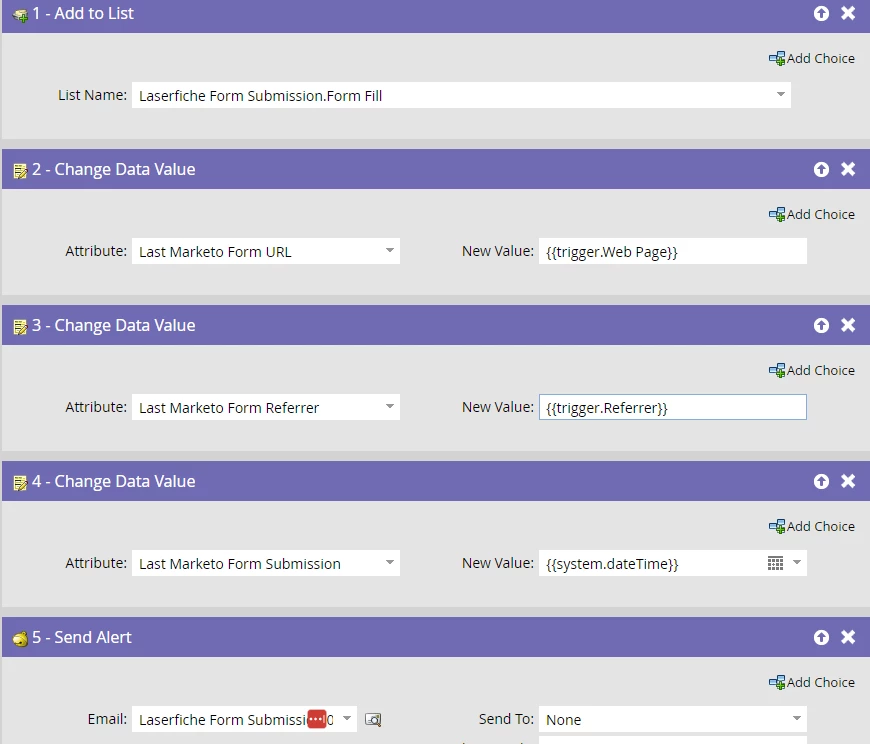
The Marketo campaign is set up as follows:

The Laserfiche form is available here - lf.etcltd.com.au/Forms/marketo
The code we are using has been wrapped in JS since that is a requirement of the Laserfiche form. See code below:
<script>$.getScript("//my.etcltd.com.au/js/forms2/js/forms2.min.js", function () {
  $('.marketo-form .cf-custom').html([
    '<form id="mktoForm_426" style="display:none"></form>',
    '',
    '<form id="hidden-form">',
    '  <input name="firstName" type="text">',
    '  <input name="lastName" type="text">',
    '  <input name="email" type="text">',
    '  <input name="mobilePhone" type="text">',
    '  <input name="company" type="text">',
    '  <input name="eTCSite" type="text">',
    '  <input name="eTCEnquiry" type="text">',
    '  <input name="eTCReferrer" type="text">',
    '  <input name="industry" type="text">',
    '  <input name="action" type="submit">',
    '</form>',
  ].join('\n'));
  MktoForms2.loadForm("//my.etcltd.com.au", "337-AQV-428", 426);
  MktoForms2.whenReady(function (mktoForm) {
    var customFormData = {
      formSelector: "#form1", // HTML form id on page (inspect via dev tools )
      fieldMap: [
        {
          marketo: "FirstName",
          custom: "Field29", // HTML form field name (inspect via dev tools label class for) repeat for all custom below
        },
        {
          marketo: "LastName",
          custom: "Field30",
        },
        {
          marketo: "Email",
          custom: "Field31",
        },
        {
          marketo: "MobilePhone",
          custom: "Field32",
        },
        {
          marketo: "Company",
          custom: "Field33",
        },
        {
          marketo: "eTCSite",
          custom: "Field34",
        },
        {
          marketo: "eTCEnquiry",
          custom: "Field35",
        },
        {
          marketo: "eTCReferrer",
          custom: "Field37",
        },
        {
          marketo: "industry",
          custom: "Field38",
        },
      ],
    };

    document
      .querySelector(customFormData.formSelector)
      .addEventListener("submit", function (e) {
        var customForm = e.target,
          mktoFields = {};

        // iterate over fields on custom form to create MktoForms-compat object
        customFormData.fieldMap.forEach(function (field) {
          mktoFields[field.marketo] = customForm.querySelector(
            "input[name='" + field.custom + "']"
          ).value;
        });

        // add to Marketo form
        mktoForm.addHiddenFields(mktoFields);

        // submit Marketo form
        mktoForm.submit();

        // stop custom HTML form submission
        e.preventDefault();
      });
  });
});
</script>
Any assistance would be appreciated!
Thanks, Megan.