Marketo forms not working in Samsung Tab | Community
Skip to main content
Sant_Singh_Rath
Adobe Champion
Adobe Champion
July 26, 2018
Solved

Marketo forms not working in Samsung Tab

  • July 26, 2018
  • 2 replies
  • 3178 views

These are the model that marketo forms are not supporting.

DeviceModel NumberAndroid VersioniOS Version
BNE000898SM-T1134.4.4--
BNE000852SM-T1134.4.4--
BNE000853SM-T1134.4.4--
BNE000897SM-T1134.4.4--


Does anyone facing the same issue?

This post is no longer active and is closed to new replies. Need help? Start a new post to ask your question.
Best answer by SanfordWhiteman

... and what, exactly, do you mean by "not supporting"?  That's too vague to do anything with. Supply screenshots of the output and links to the exact URL you're testing.

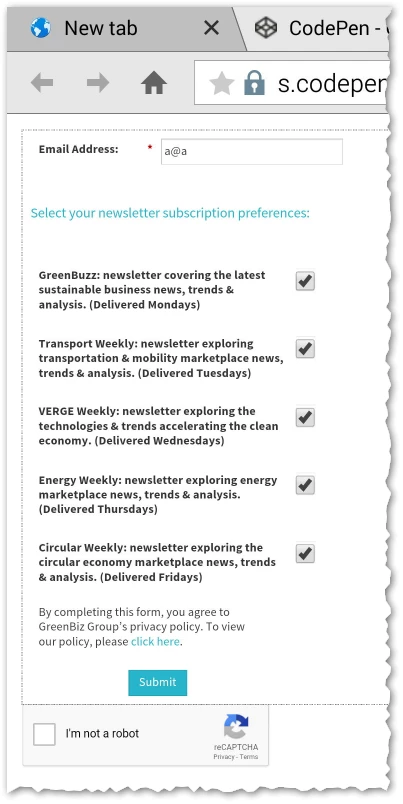
Here is a shot of a form in Android Browser 4.4.4:

2 replies

Jay_Jiang
Level 10
July 26, 2018

What app you are using to browse the internet? Try installing chrome or firefox?

gkrajeski
Level 10
July 26, 2018

Agree with @Jay Jiang that we need more information to diagnose.

  • Browser (name, version, settings).
  • Are javascript & cookies enabled?
  • Do you have an example of a form you are trying?
  • Have you tried any other forms, or is it just Marketo forms?
  • Is this on a Marketo Landing page or is it an embedded form?
SanfordWhiteman
SanfordWhitemanAccepted solution
Level 10
July 26, 2018

... and what, exactly, do you mean by "not supporting"?  That's too vague to do anything with. Supply screenshots of the output and links to the exact URL you're testing.

Here is a shot of a form in Android Browser 4.4.4: