Carly_Bacak
Level 2
May 2, 2019
Question

Marketo Form Fills Going To Junk/Spam Folder

  • May 2, 2019
  • 2 replies
  • 4479 views

Hello!

Here the deal - We have a form on one of our sites - the email alert we (the company) gets when the form gets filled out is from the user who filled out the form. Great! However, we are getting a few here at there that are going straight to the junk/spam folder. This is not great as we want these leads to go to our inbox - not spam - in order to get them taken care of quickly. It seems as if the "spam" filter doesn't like the names and email addresses that come through causing it to go to spam. As we have legitimate form fills that are from not common names. Here is what the form looks like when we built it.
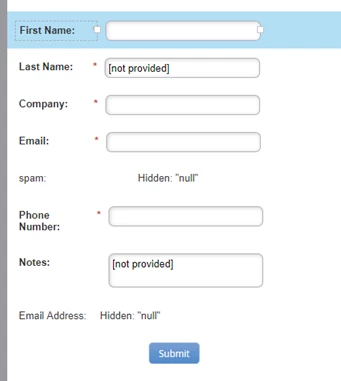
Is there a way to stop this from happening? Is it as easy as taking the "spam" filter off the form? Or should we have our email alert emails sent from us not the person who filled out the form?

Thank you for your help!

This post is no longer active and is closed to new replies. Need help? Start a new post to ask your question.

2 replies

Bryan_Epstein
Level 5
May 2, 2019

If this is happening internally on your alerts, that is actually a great problem to have. The reason being is that you can pretty much control what happens on your side of things. The email alert emails should be sent from your internal From address. This is the same address that you would be using for all of your outbound/promotional emails. This should solve the majority or all of your issue. There are also a few other things that you can do:

  • Make sure that the Marketo IP address or addresses are white-listed for deliverability. You can work with your Customer Success Manager on that.
  • Work with your sales team to ensure that they add the domain (i.e. email.YOURDOMAIN.com) to their Safe Senders list. The safe senders list is something for Outlook, but there's probably something similar for other email clients.
  • Make sure your email is marked as Operational/Transactional
Carly_Bacak
Level 2
May 2, 2019

Thank you @Bryan Epstein! Let me look into these points and will let you know how it goes!

Level 4
May 2, 2019

Bryan's advice above is spot-on -- the key thing to note is that the cause of this issue is likely in your email, not the form itself. If you want to share a screenshot of your email in the editor (and potentially your SPF/DKIM settings in Admin), we may be able to help troubleshoot more specifically.

Carly_Bacak
Level 2
May 2, 2019

Thank you @Michael White​! Here is a screenshot of the email in the editor -

Bryan_Epstein
Level 5
May 2, 2019

For our alerts, I will typically do the following:

From: Your Company or Name

From Address: YourCompanyEmail@email.YOURCOMPANY.com [or whatever you have in your SPF/DKIM records]

Reply-to: Your Email Address or a My Token that includes multiple people on the reply

Subject - You can add the full name lead token here, so that people know who it is coming from.

Since these are internal alerts, it helps more to know that it is coming internally and is standardized rather than from potentially unknown names.