
Marketo emails showing up as BULK - with no ability to show images | Community
Skip to main content
Dan_Stevens_
Level 10
November 10, 2016
Question

Marketo emails showing up as BULK - with no ability to show images

  • November 10, 2016
  • 3 replies
  • 4976 views

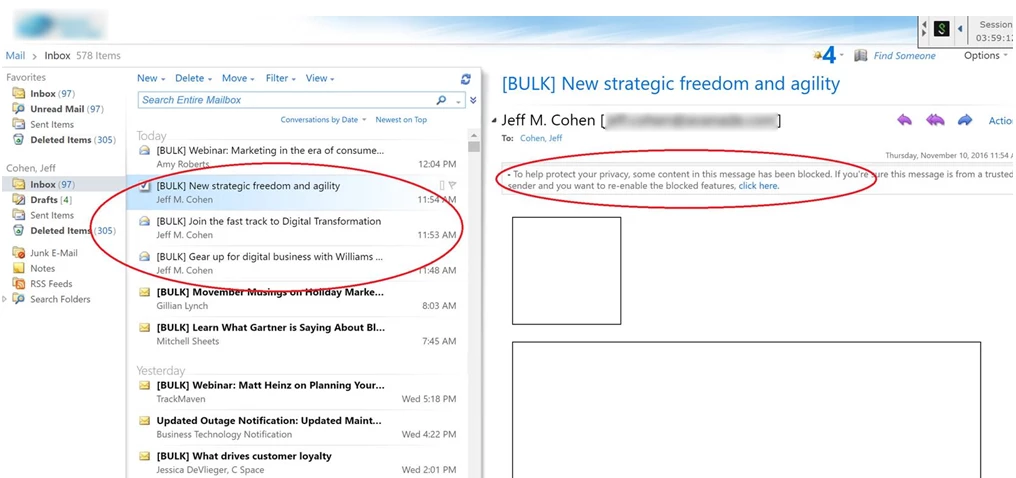
We've identified yet another client of ours who filter all Marketo emails as follows:

  • When the email is sent, the words [BULK] are appended to the subject line
  • Images are blocked
  • When the user clicks the "click here" link to unblock all features (like images), the images remain broken/non-viewable.

Other than asking the client to whitelist our IP range (which hasn't worked with prior clients who have done this for us), is there anything we can do?  We already have our SPF/DKIM setup properly, use branded tracking links, and send from our company's domain.
This post is no longer active and is closed to new replies. Need help? Start a new post to ask your question.

3 replies

Grégoire_Miche2
Level 10
November 11, 2016

HI Dan,

Is this a large or small company?

In other terms, is this a feature of their in-house emailing servers or something provided by a ISP of any kind?

-Greg

Dan_Stevens_
Level 10
November 11, 2016

Hi Greg - It's a very large, global company.

Dan_Stevens_
Level 10
November 11, 2016

Can anyone from Marketo's email deliverability team weigh in on this?

@Kiersti Esparza

Kiersti_Esparz1
Level 4
November 11, 2016

Dan,

Please reach out through Support on this issue to have this looked at by the Deliverability Team.  There are a lot of reasons for bulk folder delivery that we would need to look into.

Delivery to the bulk folder is often driven by the reputation of the individual sender.  Our team would start with high level questions about how the sender is acquiring their leads and how are they maintaining their database. 

-Kiersti

Kiersti Esparza
SanfordWhiteman
Level 10
November 11, 2016

From the screenshot, it looks like an intermediate server/service is changing the image src. I say this because OWA does not appear to be aware that clicking to enable images will have no effect. If you could get on a machine where this is happening it would be easy to see where those URLs are being rewritten to, and presumably figure out which software is making the change.

Dan_Stevens_
Level 10
November 11, 2016

I started to look at the source and noticed in the email header that DKIM is signed by mktosender.com.  Shouldn't this be our domain?

Kiersti_Esparz1
Level 4
November 11, 2016

You may see two DKIM signatures.  One is your domain and the other is a Marketo domain.

If you don't see your domain also in a DKIM signature it may not be set up in the Marketo Admin console. 

That particular signature indicates that you are sending from a subset of Marketo's IPs reserved for low volume, highly-vetted customers.  I would definitely want to dig into these issues more keeping from a deliverability perspective. 

Kiersti Esparza