Marketo Does Not Recognize my LinkedIn Lead Gen Forms | Community
Skip to main content
Level 2
October 25, 2022
Solved

Marketo Does Not Recognize my LinkedIn Lead Gen Forms

  • October 25, 2022
  • 1 reply
  • 5901 views

Hello I have created multiple lead gen forms on my LinkedIn account.  But Marketo is only recognizing the first form I created.  It will not recognize any other form that I have recently created.  I have disconnected my LinkedIn account from Marketo and reconnected it.  But I still only see the one form that I created in Marketo.  I don't see the other forms. 
This post is no longer active and is closed to new replies. Need help? Start a new post to ask your question.
Best answer by smadhok

Hi there, I'm also having the same issue, I've however end a test lead on the linkedin campaign and it still hasn't shown up for some reason!


Hey Jonathan

I encountered the same situation while creating LinkedIn Lead Gen Forms for my company. A few things helped me to sort it out: 

  1. As mentioned by Darshil, make sure you send a test lead via LinkedIn Form before Marketo starts recognising your form submissions. 
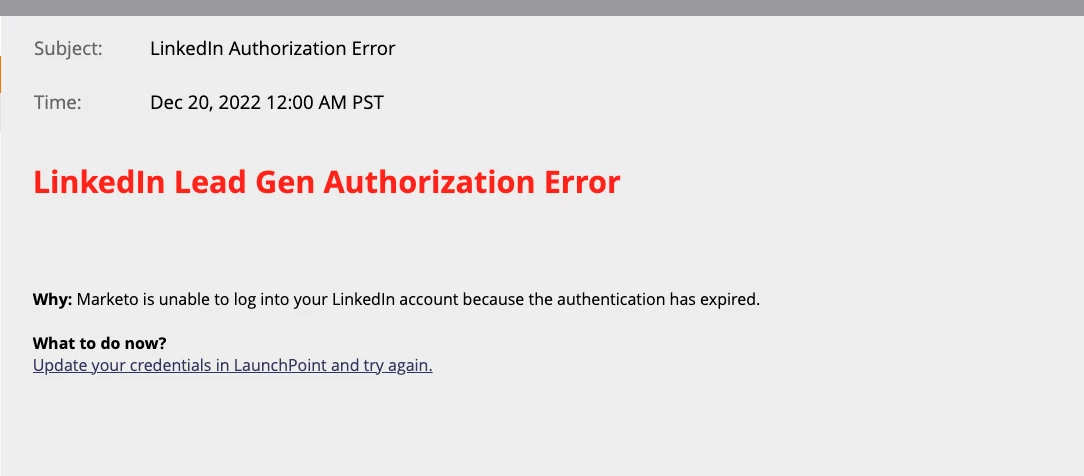
  2. Check for Marketo notifications if your LinkedIn Lead Gen is having any authorisation errors. 
  3. I made sure I am using the correct Trigger: Fills out LinkedIn Lead Gen Form , Lead Gen Form Name “contains” ProspectingEMEAGeneralJ2UWhitepaperENB

        Try these three and let me know if it works. All the best 🙂

1 reply

Darshil_Shah1
Community Advisor and Adobe Champion
October 25, 2022

I assume you're not seeing the LinkedIn lead gen forms in the trigger/filters in the SL. When people submit their information in a LinkedIn Lead Gen Form, that information is pushed to Marketo immediately, making the form available in the Lead Gen Form Name drop-down. Form names won’t be visible until at least one person has submitted the form. Are you not able to see the forms in the drop-down that have one or more submissions?


dianasandate01
Level 1
October 25, 2022

Would they be able to create a report or smartlist and pull in that form to see how its performed? 

Darshil_Shah1
Community Advisor and Adobe Champion
October 26, 2022

Without any form submissions on the LinkedIn Lead Gen Form, the value would not be available in the filter/trigger dropdown, and for the forms with one or more values, they would be able to see the form submissions in the SL using the filter - "Filled out LinkedIn Lead Gen Form". If they select "Lead Gen Form Name" is "any" they should see the form submissions on all the LinkedIn Lead Gen forms that have one or more submissions. Also, since this is available as a filter, this can also be used as an additional item to filter people in the reports that support SLs in them.
