Marketing Suspended Cause not accessible in flow | Community
Skip to main content
gkrajeski
Level 10
August 18, 2016
Question

Marketing Suspended Cause not accessible in flow

  • August 18, 2016
  • 8 replies
  • 5351 views

I inherited a Smart Campaign where Marketing Suspended = True is being set for leads.

I have an adjoining campaign that is setting a new Milestone with a status that they were suspended.

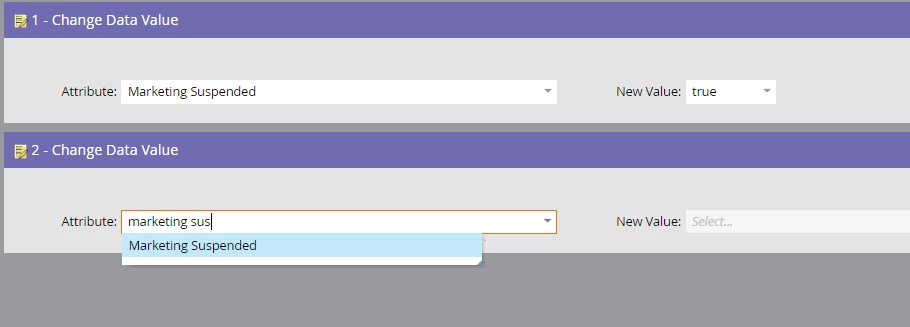
However, I know there is a Marketing Suspended Cause field, but at the same time I am unable to add it to the flow of my original Smart Campaign.
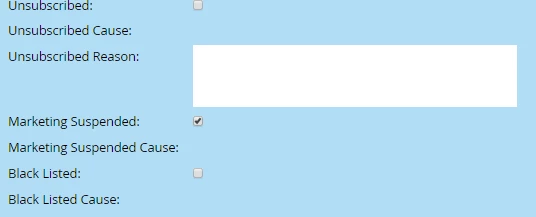
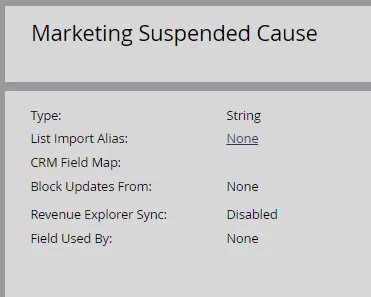
I've had a colleague on another instance confirm this inability to change the value of Marketing Suspended Cause?

In addition I would like to know how, if possible, one can update this field!

Are there automated processes that would update this field that are outside 'our' control?

I wonder if the other "cause" fields behave the same...

Thanks in advance!

This post is no longer active and is closed to new replies. Need help? Start a new post to ask your question.

8 replies

Jim_Thao7
Level 8
August 18, 2016

AFAIK, this is a system managed field.

gkrajeski
gkrajeskiAuthor
Level 10
August 18, 2016

And how is it updated by the system then?

My understanding is that the Marketo users are the ones who flag & unflag Leads.

Jim_Thao7
Level 8
August 18, 2016

Not entirely sure, but I know that I've never been able to use that field. 

You can see that it's a system managed field because you can't import into it or use it inside of Marketo.  If you try to import a list with that field and a value, you'll see that you can select the field, but you can't update it because it's blocked (system managed).

gkrajeski
gkrajeskiAuthor
Level 10
August 19, 2016

Found this doc that outlines Marketing Suspended, but no mention of the cause field: Understanding Unsubscribe - Marketo Docs - Product Docs

Marketing Suspended

This field is set by the user for placing leads on a temporary unsubscribe. Leads can only attain this status if they are manually changed, or a change data value flow step is utilized.

And, furthermore, there is no mention of "marketing suspended cause" in the docs AT ALL!

Search - Product Docs

Josh_Hill13
Level 10
August 19, 2016

The Cause will be "flow action" or something else.


If you really want to set it yourself, create a new field.

gkrajeski
gkrajeskiAuthor
Level 10
August 19, 2016

I was looking to do it as a flow step, as in Change Data Value (see image above), however it is not there as an option.

Support is gathering the intended use for that field for me, and I'll share once I get that.

Jamie-Carey
Level 4
October 24, 2016

Did Support ever get back to you? I'm having the same issue.

Roxann_McGlump1
Level 5
October 24, 2016

Hi Geoff,

The "Marketing Suspended Cause" is only populated with a reason for Marketing Suspended if Marketo suspends a lead through an automatic process. This almost never happens which is why this field is almost always empty. The example I was given was this:

• A Sales Insight plugin user has sent a sales email to a new email address (an address not currently in the Lead Database). They will see the following message:

"Lead created by Sales Insight with unknown name"

Jamie-Carey
Level 4
October 25, 2016

Roxann, this may be how Marketo systematically decides to use this field, but it certainly doesn't make sense in the UI to marketers. Can you open a bug report or push this back to engineering to request that it be changed? If marketers are the ones using the "Marketing Suspended" field, then marketers should be the ones using the "marketing suspended cause" field OR at the very least given access to use it instead of only letting the system use it.

Mike_Reynolds2
Level 10
October 31, 2016

@Geoffrey Krajeski - Production​

Here’s all the info we’ve gotten from our Product team about this field and how it’s managed:

"The purpose is to provide additional details about why a lead may have been marked by Marketo as “marketing suspended”. This does happen from time-to-time, for example in the following situation:

  • A Sales Insight plugin user has sent a sales email to a new email address (an address not currently in the Lead Database). They will see the following message:

I can’t find other examples of when the system sets this field, but this is why it exists and one example of how it can get populated. The customer can also create a Smart List in their subscription with “marketing suspended = true” to browse through leads that have been marked this way and understand more about why it is happening in their particular instance. If it is blank, it almost always means a Smart Campaign changed the field through a Change Data Value flow step (maybe by a lead disqualification campaign)."

@Jamie Carey​​ This is the expected behavior for how the field operates, so it wouldn't be considered a bug at all. Best way to get the behavior changed would be through submitting an idea in the Ideas section of the Community here. Of course, if you'd like to make the field do specific things depending on specific circumstances, you could do what @Josh Hill had suggested and create a new custom field. Then you can use smart campaigns to populate the field however you want for whatever the circumstances.

-Mike

Jamie-Carey
Level 4
October 31, 2016

Hey Mike, thanks for answering. I do understand that it's expected behavior from how it was designed, but it's not expected behavior from how the UI presents the Marketing Suspended field (since that is not system managed.) It's confusing and adding another custom field that is for the same purpose and would be named similarly named creates system clutter and is a workaround. I'll open an Idea, I'm just surprised to see this being controlled by the system for an actual edge case instead of opening it up to the user.

Mike_Reynolds2
Level 10
October 31, 2016

I agree. There's always going to be rough edges that need to be filed down. This is one of them. Best I can really offer is a work around (the custom field) and a means to get the behavior changed (submitting an idea) for the future.

June 6, 2017

I encountered this today.

Have you considered creating an Interesting Moment > Milestone 

and fleshing out the Description with details eg "Marketing Suspended due to Inactivity (Six Months)" ?

Jamie-Carey
Level 4
June 7, 2017

We wouldn't want to necessarily sync that information to SFDC especially since we try not to put operational issues into Interesting moments since we tokenize them into MQL alerts.

January 18, 2018

Alternatively, you could have a Person Field created called "Marketing Suspended Cause" and you'll use this field along with criteria to "Change Data Value" to change the status of those Suspended once they meet the criteria you call out.