Manually Unsubscribe - in Marketo | Community
Skip to main content
October 17, 2018
Solved

Manually Unsubscribe - in Marketo

  • October 17, 2018
  • 1 reply
  • 4587 views

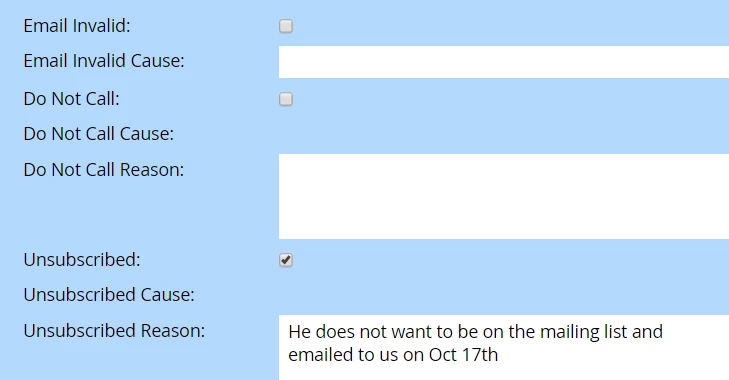
Q1) Someone wants to be unsubscribed from the mailing list....Am i doing this correctly? I went into Database and clicked here.....there are many threads on the forum but it is way confusing as answer should be simple.

Please let me know if this is correct?

If it is a list of peoiple who want to be unsubscribed what smart campaign and flow should I use?

Q 2) Blacklisted: it means people will not even get operational emails (correct?) If I am wrong please provide correct answer.
This post is no longer active and is closed to new replies. Need help? Start a new post to ask your question.
Best answer by JDNelson1

In 99.9% of instances, checking that box will work just fine; unless for some obscure reason you or anyone has changed the functionality of your unsubscribe out of box...

1 reply

Ronen-Was-SRpro
Level 5
October 17, 2018

Hi,

I think what you see is a list of unsubscribers.

Blacklisted leads don't get any emails.

You can get additional information here- Understanding Unsubscribe - Marketo Docs - Product Documentation

Ronen Wasserman
October 17, 2018

Hi Ronen,

I actually went to the lead in the database and "clicked" on unsubscribe - I assume this is saved in the Marketo Database...as an unsubscribe..

So, is that correct or I can only do this unsubscribe using smart campaigns?

Nimisha

JDNelson1Community AdvisorAccepted solution
Community Advisor
October 17, 2018

In 99.9% of instances, checking that box will work just fine; unless for some obscure reason you or anyone has changed the functionality of your unsubscribe out of box...