Malformed Link Creation using Velocity Script | Community
Skip to main content
Level 5
March 16, 2022
Solved

Malformed Link Creation using Velocity Script

  • March 16, 2022
  • 2 replies
  • 4609 views

Business requirement is to add specific URL in the email assets including UTM parameter field.  However, there are two different velocity script created in which one of them need to add the URL within the Velocity token and this link does not create  Malformed Link  refer below code


#set( $UTM= ${lead.encryptedID} )
#set( $url = "https://www.google.com" )
#set( $encryptedValue = $esc.url($UTM))
#set( $encryptedURLPrefill = $url + "?UTM=" + $encryptedValue)
${encryptedURLPrefill}


Below OUTPUT URL is working fine
 http://www.google.com?UTM=niuwtv%2FX6QbChEVV46iplJEmx02eOtwqJzG%2Fnm9fmYouZwADkHr%2BMg%3D%3D 


But, business need is to take out the URL from velocity token and use only UTM parameter via velocity token. In that case, Malformed Link is being created and traced in Email Link Performance report. refer below code


#set($UTM= ${lead.encryptedID})
#set($url = "dummy text")
#set($encryptedValue = $esc.url($UTM))
${encryptedValue}


did anyone faced this issue for Malformed Link Creation using Velocity Script what can be best way to resolve this issue?


malformed link example


google.com/set(%20$UTM%20=%20$%7Blead.encryptedID%7D%20) 
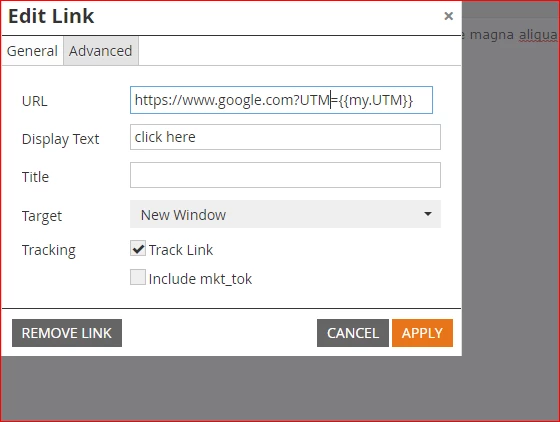
Best answer by Darshil_Shah1

Yup! please refer below image

Also, I see the given example for your URL is not converting + sign in %20 but when we use the velocity token it does. it look like you are not using velocity token in the URL. are you using lead token only in UTM?  


Thanks for sharing that! I’m not referencing any lead token in the link - just the velocity token.


2 replies

Darshil_Shah1
Community Advisor and Adobe Champion
March 16, 2022

Hey, couple of notes for both the velocity script snippets below:

Script - 1


#set( $UTM= ${lead.encryptedID} )
#set( $url = "https://www.google.com" )
#set( $encryptedValue = $esc.url($UTM))
#set( $encryptedURLPrefill = $url + "?UTM=" + $encryptedValue)
${encryptedURLPrefill}


Below OUTPUT URL is working fine
 http://www.google.com?UTM=niuwtv%2FX6QbChEVV46iplJEmx02eOtwqJzG%2Fnm9fmYouZwADkHr%2BMg%3D%3D 


The URL added via the above script will not be tracked in Marketo. More on tracking URLs added via velocity here.


Script - 2


#set($UTM= ${lead.encryptedID})
#set($url = "dummy text")
#set($encryptedValue = $esc.url($UTM))
${encryptedValue}


did anyone faced this issue for Malformed Link Creation using Velocity Script what can be best way to resolve this issue?


malformed link example


google.com/set(%20$UTM%20=%20$%7Blead.encryptedID%7D%20) 
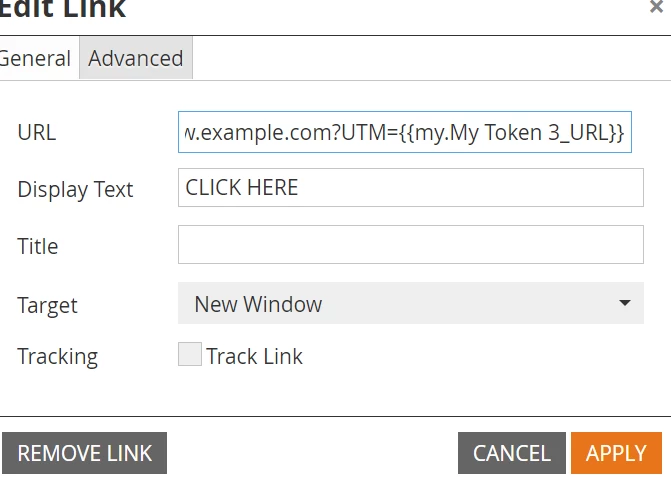

You can either output the entire URL (<a> through closing </a>) using the email script - this way you'll be able to track the activities on the URL given that you include the protocol outside of variable in the anchor tag, or use the existing script and include the class="mktNoTrack"  in the HTML of your link, however this'll disable the tracking on this link. Also, I don't think you need to set the $url variable here, if you aren't using it anywhere.

Refer this community article.

Level 5
March 16, 2022

Hi @Darshil_Shah1 ,


I did the html changes and used class="mktNoTrack" but the link is still not correct it is displaying as same google.com/set(%20$UTM%20=%20$%7Blead.encryptedID%7D%20) 

my first objective is to generate the correct URL and ignoring the fact that if link is outside of velocity scripts it will be not traced in Marketo. However, it can be checked in third party tool like GA.     

Jay
Darshil_Shah1
Community Advisor and Adobe Champion
March 16, 2022

I'm unable to replicate this at my end! I get the correct UTM params updated in the email and in the browser upon click. The value for the abc UTM parameter is populated from a lead token. Where are you appending the "?UTM=" in the URL? I don't see that in the URL shared by you.


SanfordWhiteman
Level 10
March 17, 2022

n.b. you shouldn’t use the curly braces here (though it would not cause the behavior you’re describing):

#set( $UTM = ${lead.encryptedID} )


instead do:

#set( $UTM = $lead.encryptedID )


Level 5
March 20, 2022

thanks for the details but I am still facing the same issue. In email editor preview the correct value is displayed but as soon as I open the link from my inbox it is not working. 


Jay
Jo_Pitts1
Community Advisor
Community Advisor
March 20, 2022

@jay00031987-2,

what does the current code look like?

What is the link that you get in your inbox look like (just to confirm the problem hasn't changed along the way)

Cheers

Jo