Making default value in dropdown the same as one of the options | Community
Skip to main content
Level 3
July 11, 2018
Solved

Making default value in dropdown the same as one of the options

  • July 11, 2018
  • 3 replies
  • 7018 views

We have a request to set a required country dropdown field such that one of the countries in the list is also the default option. Most people will be from one particular country. The problem is that the user cannot just bypass that field and let that displayed country be their selected choice; they have to actively select it from the dropdown or the form won't submit. I tried making the question not required and submitted the form, but it didn't update the country in my record to equal the default country at the top of the list. Is there any way to accomplish this?
This post is no longer active and is closed to new replies. Need help? Start a new post to ask your question.
Best answer by SanfordWhiteman

3 replies

Jackie_Potts
Level 6
July 11, 2018

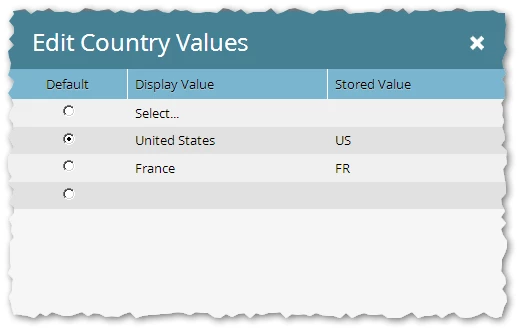
You should be able to edit values and have one value be your default value. For example on country, have United States be default. Just make sure that it is also typed in as the stored value, making sure the stored value is not empty.

Josh_Hill13
Level 10
July 11, 2018

You should make it a required field.

You also need to adjust the default per the docs.

N_A_CAuthor
Level 3
July 11, 2018

Hi Josh and Jackie, I do know how to change the default value by typing in the field next to the "Default" radio button at the top of the list, but the "stored" column on that very first option is locked so I can't enter anything there. If I try to do it with the advanced editor, I can only add a new value to the top of my list of countries, while still having that default option at the very top with no way to give it a stored value. Is there a way to override that default option in the editor and somehow tag it as "selected?" I'm not finding anything about my particular situation in the product docs, and have hunted through the discussions for a good while...

SanfordWhiteman
SanfordWhitemanAccepted solution
Level 10
July 11, 2018

N_A_CAuthor
Level 3
July 12, 2018

Hi Sanford, I'm probably not explaining my problem very well. The customer wants "Germany" to be the default value in the dropdown. The problem she's having is that she cannot just submit the form with Germany showing like it is. It prompts you to make a choice from the dropdown, because it's required. She doesn't want people to have to do that. She says that pretty much all of their audience will be in Germany, so wants to make that one less action they have to take in the form. Is there any way to code the default option in the advanced editor, so that I can enter a stored value for Germany? Unless I'm missing something, there's no way to add a stored value in the default line of the simple editor. I'm not sure that would solve the issue of the form not submitting without actively opening the dropdown and choosing Germany though. My next suggestion to them is going to be to put Germany at the very top of the list of countries and leave "select" as the default. I feel like that's the better way to go anyway...probably better to force them to actively choose their country instead of letting it be pre-selected for them...