Lookup with the Database | Adobe Higher Education
Skip to main content
Level 4
November 12, 2020
해결됨

Lookup with the Database

  • November 12, 2020
  • 2 답변들
  • 6571 조회

I have exported a segment from crm based on certain conditions. I need to make an email blast to this segment out of Marketo, so will need to perform a lookup with the database based on the email address. I have more than 10000 records. What would be the quickest way to find out how many of them exists in Marketo?

이 주제는 답변이 닫혔습니다.
최고의 답변: Salytics

Hi Yash,

DISCLAIMER: These are NOT the most elegant solutions, but they should work.

1) List Upload

  • Create a program in Marketo to upload your exported list to
  • Upload your CRM export into a Static List in the program
  • Create a Smart Campaign in the program with the Smart List filter "Lead was Created" with the List Name constraint. If a lead was created by your list, it means they were not in Marketo before. Existing leads will be excluded.
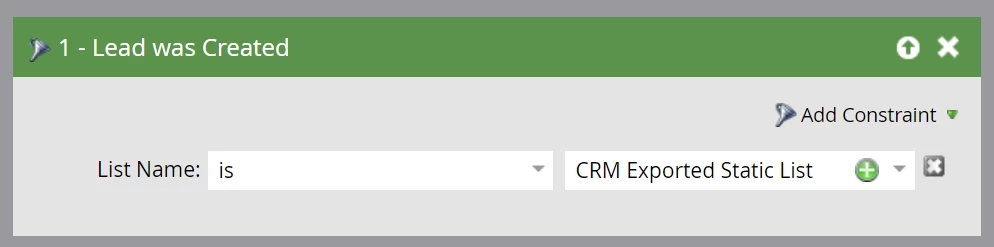
  • Add in the flow steps of "Remove from List" and "Delete Person". This removes all of the new leads from your static list and Marketo.
  • Now you can use the Static List for your email blast


2) Spreadsheets (Excel)

  • If you don't want to import leads to Marketo, you could also identify the existing leads using Excel.
  • First, export your leads from Marketo. The main field you need here is email address.
  • Next, compare the emails from the CRM export with the emails from the Marketo export - I recommend using index/match or vlookup
  • Delete any rows where there is no matching email. These are leads that are unique to your CRM and aren't in Marketo.
  • The remaining leads are the ones in both Marketo and your CRM


In an ideal situation, your Marketo and CRM instances would be synced so you wouldn't have to use either of these methods, but I'm assuming you have your reasons for keeping them separate.

Hope that helps!
Dan

2 답변

Michael_Florin-2
Level 10
November 12, 2020

Put these email addresses in a Smart List filter with "Email Address =". That area can hold 50k characters, so you can put in ~2000 addresses per filter. Do that 5 times, connect with "OR", and you're filtering on 10.000 addresses. The result tells you how many exist.


Here's an example with Email Address contains, but that doesn't make a difference.


Yash-3작성자
Level 4
November 17, 2020
Salytics
Salytics답변
Level 3
November 12, 2020

Hi Yash,

DISCLAIMER: These are NOT the most elegant solutions, but they should work.

1) List Upload

  • Create a program in Marketo to upload your exported list to
  • Upload your CRM export into a Static List in the program
  • Create a Smart Campaign in the program with the Smart List filter "Lead was Created" with the List Name constraint. If a lead was created by your list, it means they were not in Marketo before. Existing leads will be excluded.
  • Add in the flow steps of "Remove from List" and "Delete Person". This removes all of the new leads from your static list and Marketo.
  • Now you can use the Static List for your email blast


2) Spreadsheets (Excel)

  • If you don't want to import leads to Marketo, you could also identify the existing leads using Excel.
  • First, export your leads from Marketo. The main field you need here is email address.
  • Next, compare the emails from the CRM export with the emails from the Marketo export - I recommend using index/match or vlookup
  • Delete any rows where there is no matching email. These are leads that are unique to your CRM and aren't in Marketo.
  • The remaining leads are the ones in both Marketo and your CRM


In an ideal situation, your Marketo and CRM instances would be synced so you wouldn't have to use either of these methods, but I'm assuming you have your reasons for keeping them separate.

Hope that helps!
Dan

SanfordWhiteman
Level 10
November 12, 2020

  • Create a Smart Campaign in the program with the Smart List filters "Member of Static List" and "Person was Created". Set the "Person was Created" filter date to the current day - any lead with a created date of 'today' is a lead who was not in Marketo before

You don't need to filter that way. Person was Created has an explicit List Name constraint.

Salytics
Level 3
November 12, 2020

Great point! This simplifies the logic nicely. I updated the original post to reflect this (screenshot included). Thanks!