Local Forms | Community
Skip to main content
Level 3
March 2, 2022
Solved

Local Forms

  • March 2, 2022
  • 1 reply
  • 3114 views

Hi All,


Is it possible to pull out list of all marketing programs using local forms ?.


Thanks,

Deepthi.

This post is no longer active and is closed to new replies. Need help? Start a new post to ask your question.
Best answer by Darshil_Shah1

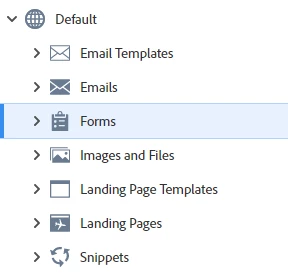
You should see all the forms in the WS by clicking the Forms in the left-tree (Ref snapshot below). 
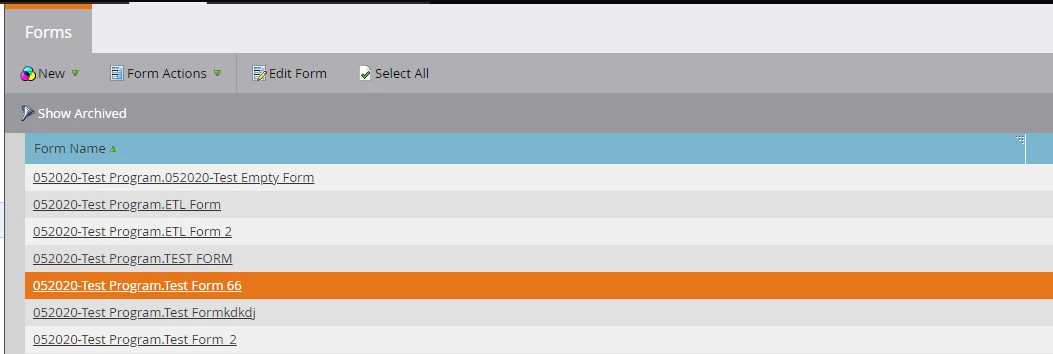
If you open up the Forms you'll only see the forms created in the DS - rather as I mentioned above click the Forms and you should be able to see all the forms in the WS on the right pane (Ref. snapshot below).
 

1 reply

Darshil_Shah1
Community Advisor and Adobe Champion
March 2, 2022

You can find all the forms within a WS in the Design Studio > Click on Form, forms created within a program will have [Program Name].[Form Name] as their name and forms created in the DS will have [Form Name] as their name, this can serve as an identifier for the local forms. You cannot export this in the form of CSV file, but can view and navigate to the forms within your WS from here. You can use Form API to export the forms which will have the parent program/folder name in the response, but this you'll need to page through multiple API calls if you've a lot of forms since this API call returns max of 200 form data.


DeepthiSwAuthor
Level 3
March 2, 2022

Hey @darshil_shah1,


Within design studio, I only see global forms :(.


Thanks,

Deepthi.

Darshil_Shah1
Community Advisor and Adobe Champion
Darshil_Shah1Community Advisor and Adobe ChampionAccepted solution
Community Advisor and Adobe Champion
March 2, 2022

You should see all the forms in the WS by clicking the Forms in the left-tree (Ref snapshot below). 

If you open up the Forms you'll only see the forms created in the DS - rather as I mentioned above click the Forms and you should be able to see all the forms in the WS on the right pane (Ref. snapshot below).