List Import/merge - corrupted values | Community
Skip to main content
Yun_Bai1
Level 4
December 21, 2017
Question

List Import/merge - corrupted values

  • December 21, 2017
  • 1 reply
  • 1523 views

Hello Marketo Expert,

Need your help to provide any thoughts for this case.

The case is: the Lead record already in Marketo with correct name "Юрий". After a list import/merge, the lead name changed to "????". The value imported in the excel sheet is correct. We used the correct way to import leads into Marketo by copy excel sheet values into a notepad file and saved the notepad file with UTF-8 format. So I am wondering how can this happen?
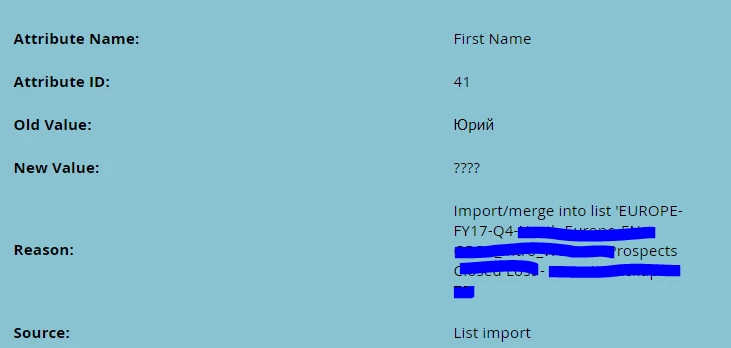
Could anything happened confused Marketo? Could duplicates leads make this strange issue happened? What are the possible conditions could lead to this issue?

Thank you very much,

Becky

This post is no longer active and is closed to new replies. Need help? Start a new post to ask your question.

1 reply

SanfordWhiteman
Level 10
December 21, 2017

Clearly an encoding issue.

If you reopen the list file, do you see the non-ASCII characters correctly?

I don't actually agree that the "correct" way is to copy-paste from Excel to Notepad. First, that's really fragile (since the default encoding in Notepad is ASCII/ANSI). Second, Marketo supports UTF16LE+BOM (what Excel calls "*.txt") directly. Or you can save to UTF8 directly from Excel using the macro I contributed here: http://blog.teknkl.com/fixing-the-current-excel-marketo-list-import-bug-unicode-characters/