List import creates duplicates | Community
Skip to main content
Level 2
October 7, 2020
Solved

List import creates duplicates

  • October 7, 2020
  • 2 replies
  • 8850 views

I imported a CSV with a single lead having two columns: Email and Company. I correctly mapped to the right email fields. But instead of updating the company name, it created a new lead, with the given company and other fields empty. I am not sure why this is happening as I have looked everywhere and found that Marketo automatically de-deduplicates upon import. I have ensured that de-duplication is activated at the beginning of the import. 


Could someone guess why this is happening? Or how I could fix it?


Thanks
This post is no longer active and is closed to new replies. Need help? Start a new post to ask your question.
Best answer by Anurag-1

File looks fine at a byte level (no hidden control characters or anything). And importing it into one of my instances wasn't a problem.


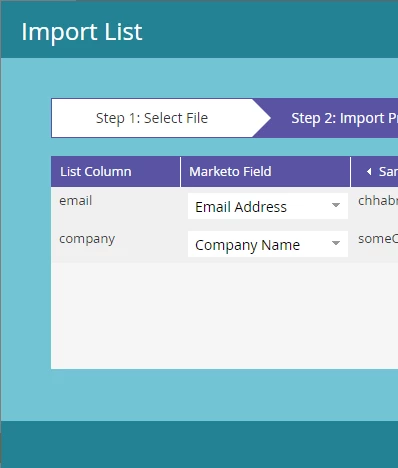
Please show a screenshot of the field mapping page when you import.


The "Notes" fields are empty.


I think I know what is happening. I know that the leads dataset in Marketo has some emails that have multiple entries (duplicated). So when I import this list, one of the duplicates gets updated and the other doesn't. (Which leads me to falsely believe that the duplicate was created at the time of import.) I checked the creation dates for the duplicates, and both of them have the same date, some time a couple of years ago. So I am guessing that Marketo really isn't duplicating it during list import. But only updating one of the records instead of both. What do you think?


2 replies

SanfordWhiteman
Level 10
October 7, 2020

Please attach a sample CSV for which this is happening (you may of course use an Email Address mailbox@email.invalid and a dummy Company name, but please make sure this exact CSV shows the behavior when you upload it).

Anurag-1Author
Level 2
October 8, 2020

Thanks for your response. Here is the CSV file with some edits. 

https://drive.google.com/file/d/1wOyZIfvjJOOQ8caooOAG4f6M1paN19Iu/view?usp=sharing

SanfordWhiteman
Level 10
October 8, 2020

File looks fine at a byte level (no hidden control characters or anything). And importing it into one of my instances wasn't a problem.


Please show a screenshot of the field mapping page when you import.

Josh_Hill13
Level 10
October 8, 2020

Marketo does dedupe by email address.


There are always flukes and scenarios where that might not occur.


How sure are you it created a dupe? Screenshots?


Do you use Lead Partitions or Workspaces?


Did anyone change the dedupe key on your instance?

Anurag-1Author
Level 2
October 8, 2020

I am new to Marketo but I am as sure as I can be. Since I also tried exporting the duplicates and the original and both of the emails are the same i.e. no white spaces, etc..


About your last two questions, I will get back if I am able to obtain answers for them. Thanks for your input.


When you say "There are always flukes and scenarios where that might not occur.",  do you mean that there is a chance that Marketo actually failed to duplicate, and made a mistake?