Links on landing page | Community
Skip to main content
December 17, 2013
Solved

Links on landing page

  • December 17, 2013
  • 3 replies
  • 2156 views
I was wondering if the following was possible: if a lead clicks a link on a landing page, is it possible to open that link in a new window?
This post is no longer active and is closed to new replies. Need help? Start a new post to ask your question.
Best answer by
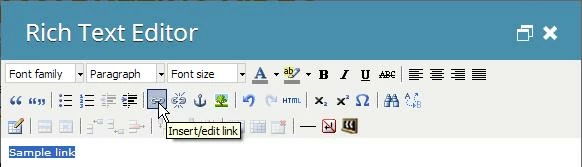
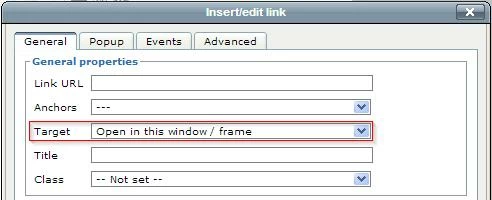
Hi Kelly - If you're using the Rich Text editor, when you insert your link, there will be a dropdown of "Target" where you can select "Open in new window (_blank)". If you've already inserted the link, highlight the text where you have a link, and click the "Insert/edit link" button in the editor and you'll see the Target option. I've inserted some images below that will show where you'll navigate to.

Alternatively, you can open the HTML code by clicking the "HTML" button. Once in the HTML code, add target="_blank" in your <a > tag. So your whole tag might look like <a href="www.marketo.com" target="_blank" >your link text here< /a>.


3 replies

Accepted solution
December 17, 2013
Hi Kelly - If you're using the Rich Text editor, when you insert your link, there will be a dropdown of "Target" where you can select "Open in new window (_blank)". If you've already inserted the link, highlight the text where you have a link, and click the "Insert/edit link" button in the editor and you'll see the Target option. I've inserted some images below that will show where you'll navigate to.

Alternatively, you can open the HTML code by clicking the "HTML" button. Once in the HTML code, add target="_blank" in your <a > tag. So your whole tag might look like <a href="www.marketo.com" target="_blank" >your link text here< /a>.


Level 2
December 17, 2013
When you insert the hyperlink on your landing page, in the edit/insert link window, select the Target in the General Properties section. You'll want to choose the  "Open in New Window" as the Target.
December 17, 2013
Thank you both!