
LinkedIn Lead Gen and GDPR | Community
Skip to main content
Robb_Barrett
Level 10
June 22, 2018
Solved

LinkedIn Lead Gen and GDPR

  • June 22, 2018
  • 4 replies
  • 9633 views

Hello Nation -

I'm working on a LinkedIn Lead Gen campaign and trying to ensure GDPR compliance. On the LI form, there's an option for privacy policy and a checkbox but I'm not seeing that data transmit to Marketo, nor is it an available field to map in the LaunchPoint. Does someone have an explanation on how to record their check (or lack of) from the form?
This post is no longer active and is closed to new replies. Need help? Start a new post to ask your question.
Best answer by Robert_Nichols1

sorry missed this, yes its pretty easy.

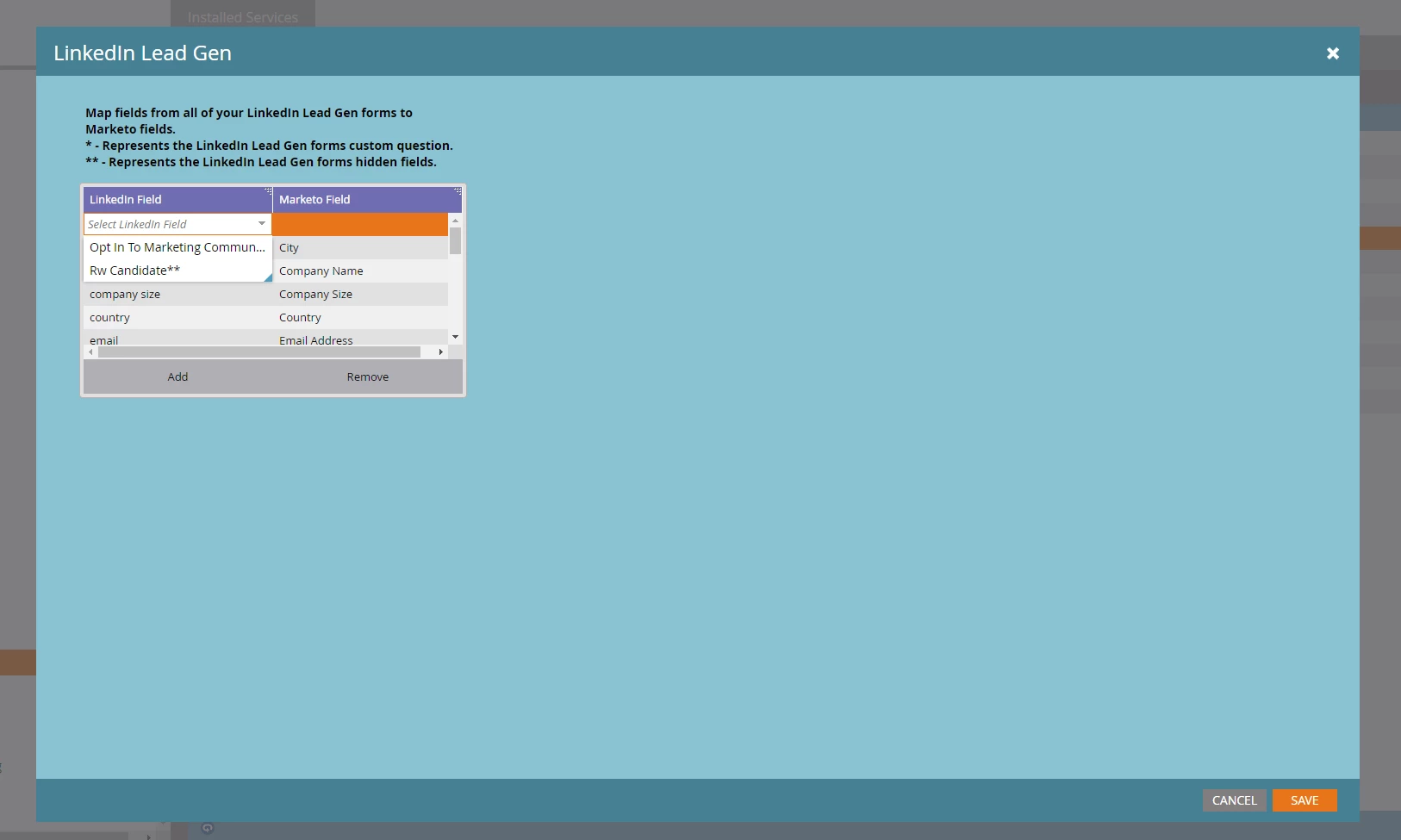
When you create the launchpoint connector - you need to map the fields, screenshot hopefully attached!

When you create custom fields you just need to redo the connector and find the custom fields and map them.

hope that helps!


4 replies

Josh_Hill13
Level 10
June 22, 2018
Robb_Barrett
Level 10
June 25, 2018

Not really, @Josh Hill​.  I know how to do field mapping but what I don't know is how to find the field from LI.  It's not in the drop down of fields that pass from LI to Marketo.

Robb Barrett
Abaran
Level 5
December 12, 2018

Hi Robb, i have the exact same issue. have you been able to find a solution to it? if so, how did you do it?

Thanks. Axel

Amy_Goldfine
Level 9
January 18, 2019

Were you guys able to find a solution? I'm looking at setting this up now.

Amy GoldfineMarketo Champion & Adobe Community Advisor
Amy_Goldfine
Level 9
December 13, 2018

Ooh this is interesting, we are looking to implement LinkedIn integration. It's possible that they don't pass from LinkedIn to Marketo, but since they're required on the LinkedIn form, you just document this in your compliance. If you have a "GDPR Notes" field you could create a Smart Campaign to update that field when they come in through LinkedIn.

You also want to make sure you have a Data Privacy Agreement signed with LinkedIn if you do not already.

Amy GoldfineMarketo Champion & Adobe Community Advisor
Robert_Nichols1
Level 3
November 11, 2020

clarification - explicit opt in box is not required in linkedin lead gen forms. You must include a link to your companies privacy policy, but allows for those who use the "legitimate interest" optin approach to use that. Therefore if you dont use explicit optin in your marketo instance you can continue to use linkedin lead gen forms.


however if you do want consent opt-in:

The the GDPR consent is a custom tickbox which you can make required, therefore you're just mapping a custom field from linkedin in the launchpoint connector to the right Marketo field.


Robert_Nichols1
Robert_Nichols1Accepted solution
Level 3
November 11, 2020

sorry missed this, yes its pretty easy.

When you create the launchpoint connector - you need to map the fields, screenshot hopefully attached!

When you create custom fields you just need to redo the connector and find the custom fields and map them.

hope that helps!