
Link URL in Swap Image screen | Community
Skip to main content
Matt_Reenstra
Level 2
June 27, 2018
Solved

Link URL in Swap Image screen

  • June 27, 2018
  • 2 replies
  • 9862 views

Hello,

Does anybody know how I can get the Link URL section editable? I can edit the Alt Text and Style, but Link URL is always grayed out so I can't enter anything.

Sorry if this has been asked before but I can't seem to find an answer on previous threads.
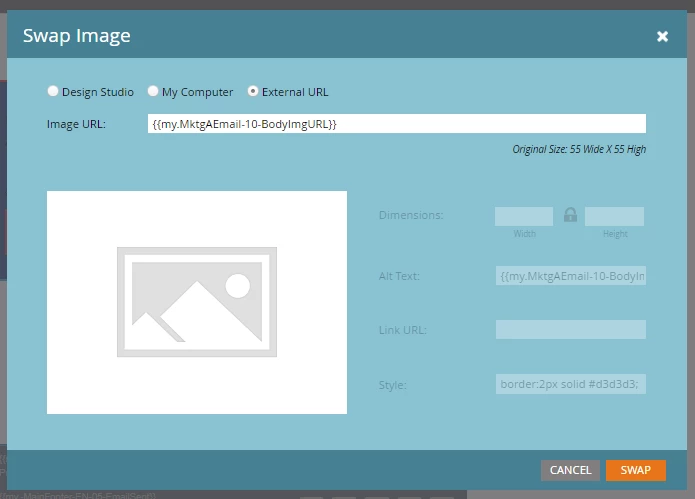
Thanks,

Matt
This post is no longer active and is closed to new replies. Need help? Start a new post to ask your question.
Best answer by Dan_Stevens_

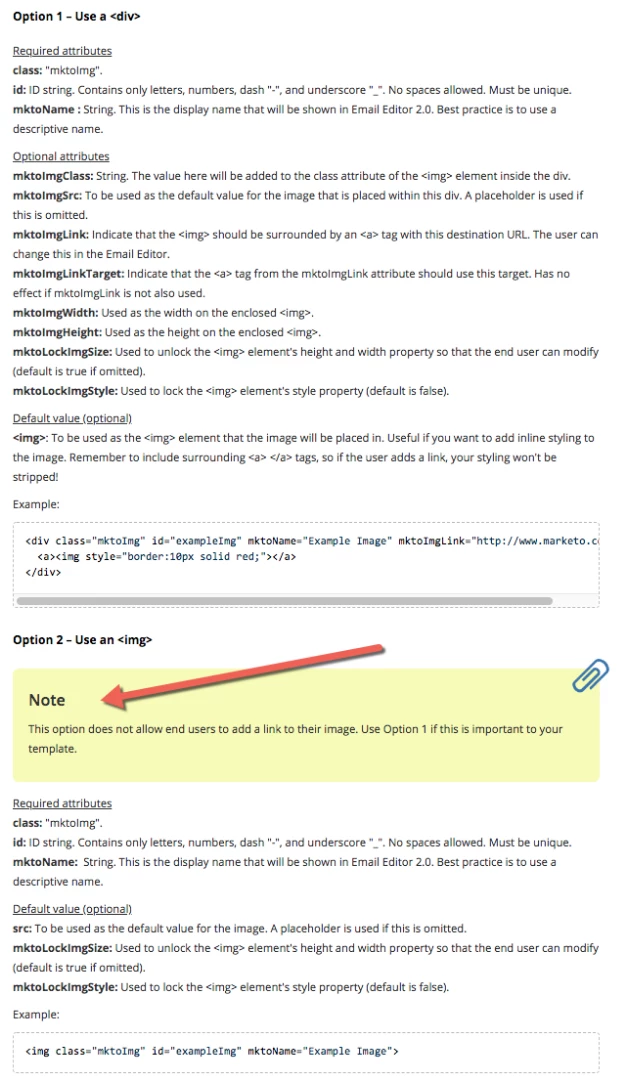
Check your email template.  If editable image elements are coded with an <img> tag, this is not editable.  You'll need to use a <div> instead.  More information here: Email Template Syntax - Marketo Docs - Product Documentation

2 replies

Dan_Stevens_
Dan_Stevens_Accepted solution
Level 10
June 27, 2018

Check your email template.  If editable image elements are coded with an <img> tag, this is not editable.  You'll need to use a <div> instead.  More information here: Email Template Syntax - Marketo Docs - Product Documentation

Matt_Reenstra
Level 2
June 27, 2018

Thanks for this Dan.