
Landing page follow up not working | Community
Skip to main content
Kate_Hahn1
Level 2
November 26, 2014
Solved

Landing page follow up not working

  • November 26, 2014
  • 8 replies
  • 4053 views
I built a landing page with a form, and a follow up thank you landing page.

The form follow up is set to direct to the thank you landing page. However, when I submit the form to test, it directs to our homepage. I looked in the Admin section and our homepage is listed as the fall back page. But, the thank you landing page is approved and ready to go so I'm not sure why it won't direct traffic to it.

I'm guessing this is a simple fix that I'm overlooking, but I'm stuck.

Thoughts?
Kate
This post is no longer active and is closed to new replies. Need help? Start a new post to ask your question.
Best answer by Dory_Viscoglio
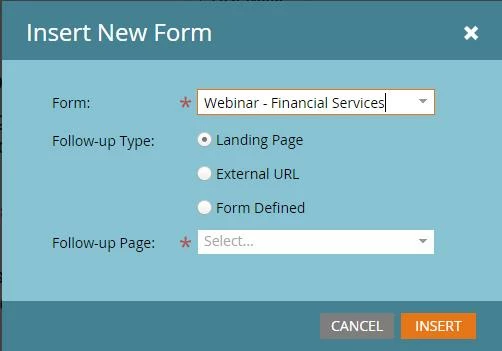
Hey Kate, it's in the form settings on the landing page. (You can doubleclick on your form to get here.) You'll want to make sure that you've set a follow up page here, as shown below.


Also, with these discussions, as long as you kept the subscribe to discussion box checked, it will email you anytime there's a new response. 

8 replies

Level 9
November 26, 2014
Did you re-approve the landing page after making that change to the form?

Kim
Dory_Viscoglio
Level 10
November 26, 2014
Also, did you set the follow up page in the form, or on the landing page itself? I always find it's helpful to set on the landing page (sort of old dog habit thing), but it always seems to work :)
November 26, 2014
To add to Dory's comment - 

I have seen a glitch where setting follow up type 'Landing Page' redirects to the fallback page, even with all assets approved and ready to go.  Because of this, I just tend to use the External URL option every time, and simply plug in the URL of the landing page I want as the thank you.  I've never had redirect issues with this option  
Kate_Hahn1
Level 2
December 1, 2014
Ok. I've reapproved the form and page -- changing the form follow up to external link with the thank you landing page URL designated. It's still directing to our main page.

I haven't set the follow up page on the landing page. How do you do that, Dory?

P.S. This is my first time using the discussion. Should it email me as folks reply?
Kate_Hahn1
Level 2
December 1, 2014
Just noticed that in the summary view of the landing page asset, it has the Redirect Rule set to None. Is that what you're referring to, Dory? I still can't find that setting.
Dory_Viscoglio
Dory_ViscoglioAccepted solution
Level 10
December 1, 2014
Hey Kate, it's in the form settings on the landing page. (You can doubleclick on your form to get here.) You'll want to make sure that you've set a follow up page here, as shown below.


Also, with these discussions, as long as you kept the subscribe to discussion box checked, it will email you anytime there's a new response. 
Kate_Hahn1
Level 2
December 1, 2014
Thank you!!!

For future viewers' reference: I used the combination of Dory's recommendations to set the follow-up page from the form within the landing page and Nate's rec to set to an external URL.

SOLVED! :)
December 1, 2014
great, glad that all worked for you!