Landing Page Editor Problems | Community
Skip to main content
July 4, 2013
Solved

Landing Page Editor Problems

  • July 4, 2013
  • 3 replies
  • 1811 views
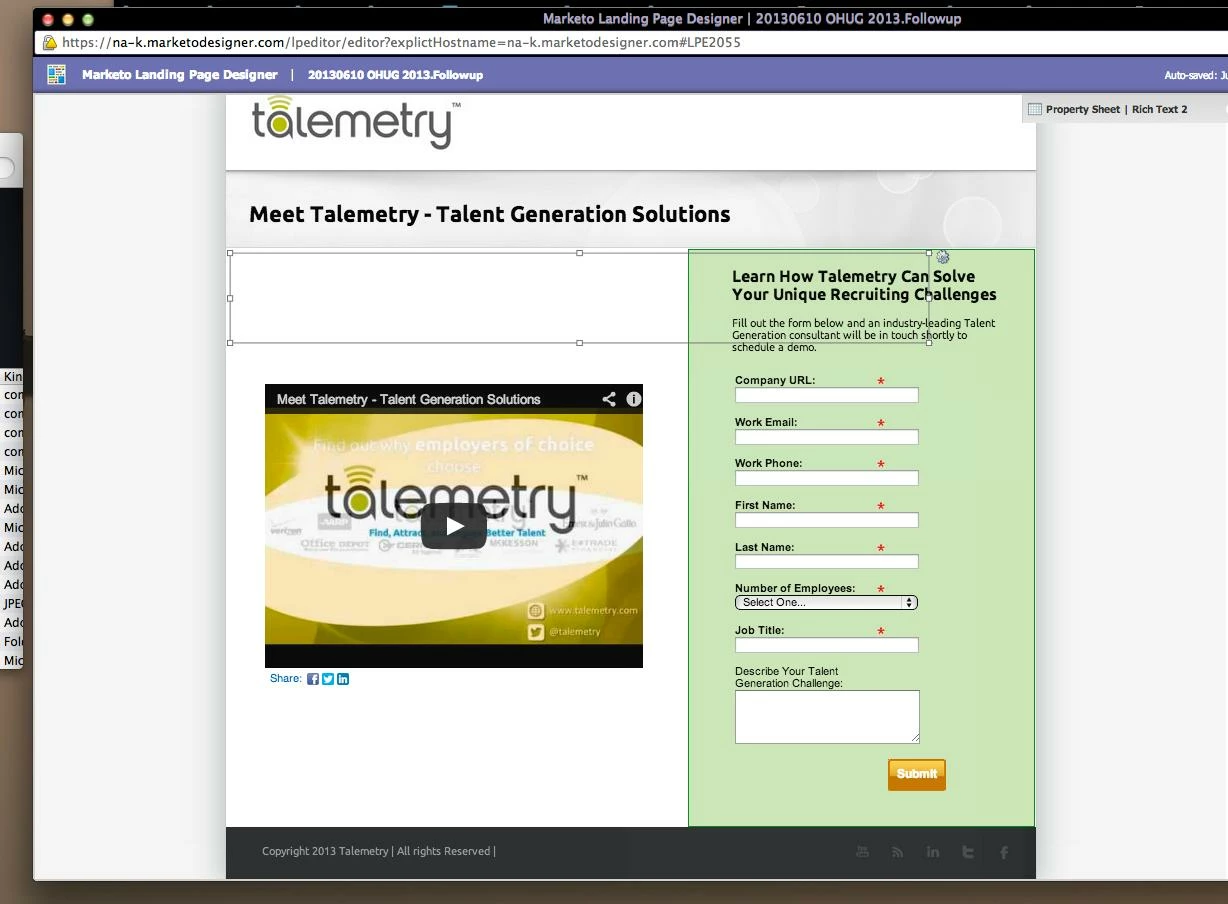
Recently I've noticed that when you're adding elements to a landing page, the grey boxes that are supposed to enclose the element are way off, making it a bit challenging to edit the size/location of elements.

The picture below shows what I'm referring to. The element selected is the "Meet Talemetry - Talent Generation Solutions" rich text element, but the position box is way below where the actual text is.

Is anyone else experiencing this issue? Will it impact how the page renders on different browsers?

Thanks!
 
This post is no longer active and is closed to new replies. Need help? Start a new post to ask your question.
Best answer by Nora_Slattery3
Hi Amanda,

I haven't had the same problem. 

Out of curiosity, have you tried doing this in a different browser?

Warm regards,
Nora

3 replies

Nora_Slattery3
Nora_Slattery3Accepted solution
Level 4
July 5, 2013
Hi Amanda,

I haven't had the same problem. 

Out of curiosity, have you tried doing this in a different browser?

Warm regards,
Nora
Level 2
July 5, 2013
Hi Amanda,

The landing page editor tries to render the page as close to the published landing page as possible. There are advanced use-cases that use Javascript and CSS  that cause it to break as you described.

In your case I do not see any such code that could be causing it. Could you tell us which browser you are using.


regards,
DJ


July 8, 2013
Thank you both for your responses. I tried the editor in Safari and it's working fine. 

Would be nice if it worked in Chrome too but at least I can finish my page now!!

cheers,

Amanda