
Issues with Email Program: selecting member of smart list | Community
Skip to main content
Dan_Stevens_
Level 10
January 28, 2014
Question

Issues with Email Program: selecting member of smart list

  • January 28, 2014
  • 4 replies
  • 2743 views
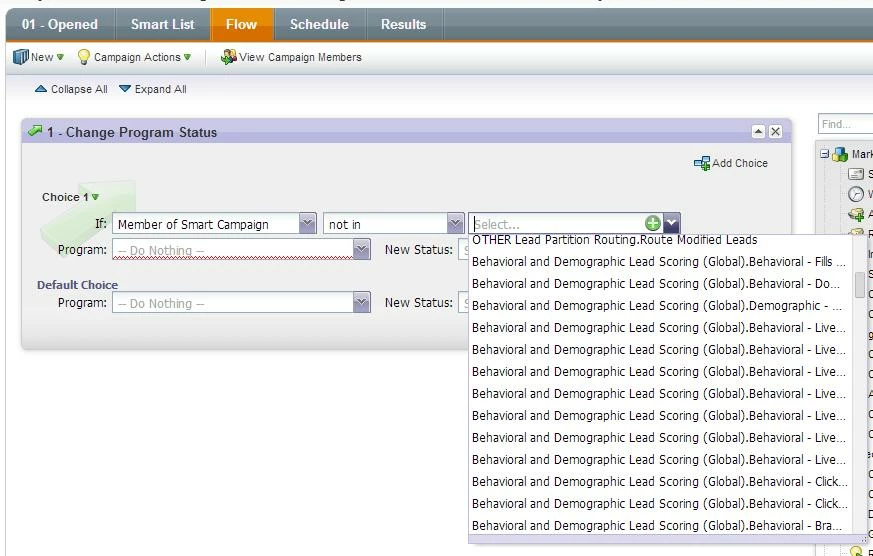
It seems like we're identifying new issues with the Email Program on a daily basis lately.  In one of our campaign flows (Change Program Status), we always include a choice (NOT Member of Smart Campaign) to disregard any employees who respond to our campaigns (usually via testing).  We've defined a specific smart list that we use in every program in Marketo.  Usually this drop-down includes the 5 or so smart campaigns that we've defined in the Lead Database.

But in this instance, the drop-down contains EVERY smart campaign contained with EVERY program/campaign in our instance - hundreds of options.  Furthermore, it's not even seeing (or allowing me to type in) the smart campaign that we usually use when it's not an Email Program.  Is anyone else experiencing this issue?
This post is no longer active and is closed to new replies. Need help? Start a new post to ask your question.

4 replies

January 28, 2014
May be a real issue, but why don't you exclude them on the Smart List instead? That way you don't have to mess with choices.
Dan_Stevens_
Level 10
January 28, 2014
The issues seems to have resolved itself.  As for not putting this filter within the Smart List, our Marketo consultant advised that it would be more efficient if we included it as part of the flow.
November 9, 2015

I have had the same error. I need to create a smart list to identify people who have not clicked on our CTA links. I can't seem to locate the email which is part of the email program. Screenshot below -

Stijn_Heijthuij
Level 6
November 9, 2015

Hi Renault,

Is the email you're looking for approved? Emails that haven't yet been approved won't show up as selectable in the interface.

November 9, 2015

Hi Stijn,

Yes the email that i am trying to locate has been approved but i still cannot locate it. I tried again this morning and had the same problem.

Grégoire_Miche2
Level 10
November 9, 2015

Hi Dan,

We sometimes observe that the droplists populate weirdly in choices or even in filters. Usually, the problem disappears with a good old screen refresh (F5).

-Greg

Dan_Stevens_
Level 10
November 9, 2015

Greg - this is no longer an issue for us (and hasn't been since 2014).  The discussion was resurrected when Renault replied to an old post.  But thanks for responding.