Issues with Dynamic Content blocks | Community
Skip to main content
patrickmurray
Level 2
January 30, 2023
Solved

Issues with Dynamic Content blocks

  • January 30, 2023
  • 2 replies
  • 3169 views

I'm trying to create an email with variable dynamic content blocks.


For context, a lead will be imported and mapped to either one or multiple segments. I want to be able to send them an email with a generic intro and then one or multiple dynamic content blocks based on what segments they are mapped to.  


I have built out the dynamic blocks for each segment and then cleared all content for the default blocks. 


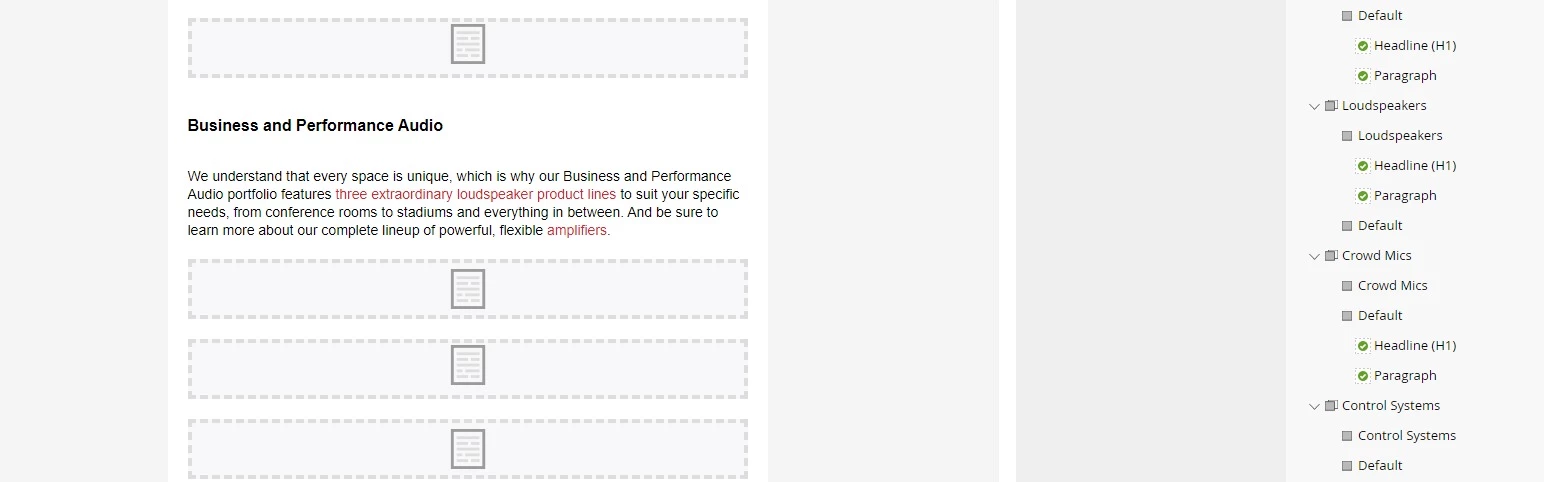
The issue I'm having is the spacing between the content blocks. The default blocks leave a blank space instead of nothing.


Is there a workaround or another best practice for what I'm trying to accomplish?
 

Best answer by ChristianeRo1

There does look to be padding in the modules between the content blocks. Typically, when I have a number of dynamic blocks/modules stacked upon one another, there is no white space between the blocks of content (in your screenshot, you see the white space between the dotted outlines of your content boxes).


If you can't adjust this setting in the local variables menu on the right side, you might consider digging into your template to see if padding has been added there (and is not adjustable). 


2 replies

Community Advisor and Adobe Champion
January 30, 2023

While the content is dynamic, the blocks still technically live in each email you create (even if there's no content). 


It looks like there's padding added to each of your modules, and this is what's causing the spacing issue as the padding is not a dynamic element. 


If you want padding between sections, consider adding it to the dynamic content area instead of as top or bottom space for the module. 

patrickmurray
Level 2
January 30, 2023

I haven't added any additional padding. It appears the extra spacing is caused by the default dynamic content blocks with cleared content.

ChristianeRo1Community Advisor and Adobe ChampionAccepted solution
Community Advisor and Adobe Champion
January 30, 2023

There does look to be padding in the modules between the content blocks. Typically, when I have a number of dynamic blocks/modules stacked upon one another, there is no white space between the blocks of content (in your screenshot, you see the white space between the dotted outlines of your content boxes).


If you can't adjust this setting in the local variables menu on the right side, you might consider digging into your template to see if padding has been added there (and is not adjustable). 


Darshil_Shah1
Community Advisor and Adobe Champion
January 30, 2023

Lurkers could refer to this thread for more ideas on this. In a nutshell, you could either house the padding/white space/etc. in the respective content module itself or use the velocity script altogether to control what gets displayed and what doesn't for each segment.