
Issue with Character encoding in form, but not in page | Community
Skip to main content
Grégoire_Miche2
Level 10
October 11, 2016
Solved

Issue with Character encoding in form, but not in page

  • October 11, 2016
  • 2 replies
  • 9950 views

Hi All,

We have a landing page with weird, unexpected behavior: The character encoding in the form fields (for prefilled fields) is not correct, while it is OK in the rest of the LP. See:
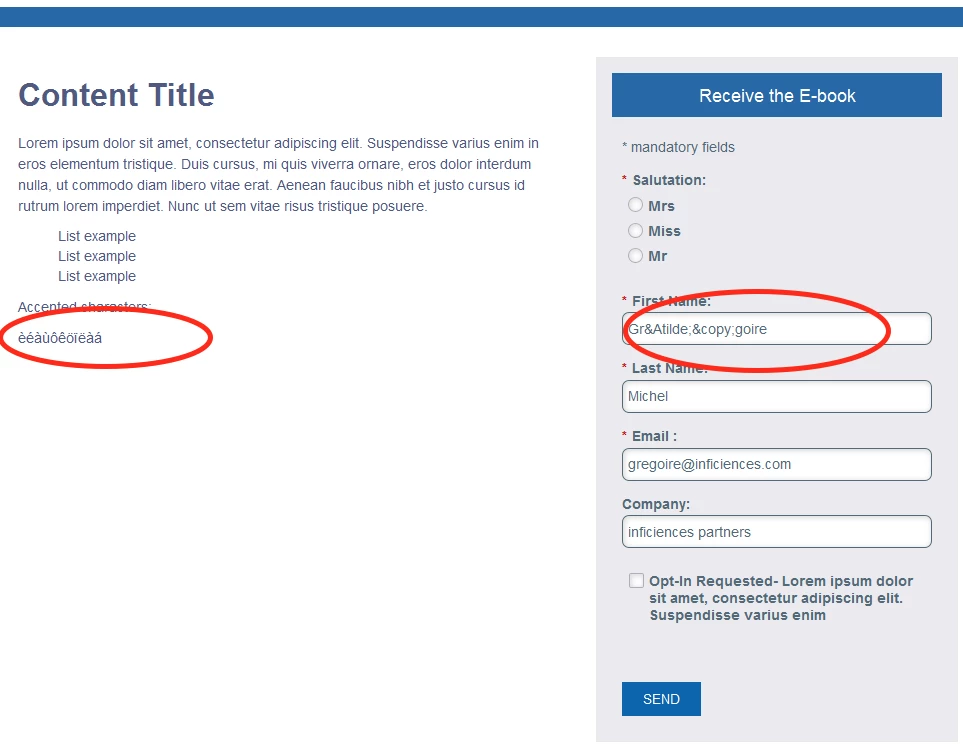
I have been entering the form with my first name "Grégoire" correctly many times and it is correctly displayed in Marketo UI.

Any idea?

-Greg

This post is no longer active and is closed to new replies. Need help? Start a new post to ask your question.
Best answer by SanfordWhiteman

Hi all,

OK, I tried to set the meta charset the following way

<meta charset="ISO-8859-1">

But Marketo will only accept utf-8

-Greg


This couldn't have helped, anyway. It's not an encoding problem but a decoding/transcoding problem at display time. As long as the data ended up in UTF8 within Marketo (which is actually independent of the form post encoding) it would still be pulled out wrong.

That is, the prob is specifically when UTF-8 stored strings are treated as if they were stored as 8859. Since the db only is going to use a single encoding per column, you'd still be storing UTF-8.

Many a hack is based on this same problem, btw.

2 replies

SanfordWhiteman
Level 10
October 11, 2016

This is 16-bit (UTF-16) JS strings being mistakenly treated as UTF-8, or UTF-8 being treated as ASCII/ISO-8859-1, then being htmlentities()-ed. I have to go to sleep but I'll respond more on it tomw.

SanfordWhiteman
Level 10
October 12, 2016

Well, this is a giant bug.  I could go on my blog with the usual "Here's a bug and how to fix it" post -- but actually, there's no fix, only a workaround, and I'd rather not advise it formally when really this needs to get fixed ASAP.

Here's how the bug happens:

  1. You populate a textbox with a character from above the first 128 Unicode characters (the ASCII range). Example: é in Grégoire (lowercase e with acute accent).
  2. This character is (within JavaScript alone, which doesn't much matter) one UTF-16 double-byte, equivalent to 0x00E9.
  3. When posted as form data, the character is split into two UTF-8 bytes (as expected) 0xC3 0xA9 and then URL-encoded as %C3%A9.
  4. The Marketo servers successfully process the sequence %C3%A9 as UTF-8, decoding it to é and storing it in a UTF-8 compatible database. So far so good!
  5. You turn on PreFill on a Marketo form for a field that contains é.
  6. When Marketo creates a the PreFill object (a standard JavaScript object), it reads the field value out of the database and runs PHP's htmlentities() (or its equivalent, Marketo has other languages in use as well) against the field value but not as UTF-8. Uh-oh. (Big uh-oh.) It appears to treat the encoding as ISO-8859-1.
  7. As ISO-8859-1, the character sequence 0xC3 0xA9 is two distinct characters, not one character represented by two bytes.
  8. Those two bytes?  0xC3 is à (A with tilde).  And 0xA9 is © (copyright).
  9. The bytes get HTML-encoded as &Atilde; and &copy;.
  10. Because textboxes are not actually HTML display elements, you see the literal "&Atilde;&copy;" instead of even the (equally wrong) é.

So, bottom line, @Justin Cooperman​ this is in need of a back-end fix.

Grégoire_Miche2
Level 10
October 12, 2016

Thx @Sanford Whiteman for this!!

If we encode the page in ISO-8859-1, will this workaround/fix the bug?

-Greg

Justin_Cooperm2
Level 10
October 12, 2016

We already have a P1 bug open on this and it will be patched soon.

Justin

Grégoire_Miche2
Level 10
October 12, 2016

Hi Justin,

Thx.

Is it going to be released to all instances or do you need that we fill in a support ticket?

-Greg

Justin_Cooperm2
Level 10
October 12, 2016

It will be patched for all customers. It was a regression.

Justin