
Is this the right way to Delete Person from Marketo, but NOT SFDC? | Community
Skip to main content
Danielle_Wong
Community Advisor
Community Advisor
March 13, 2019
Solved

Is this the right way to Delete Person from Marketo, but NOT SFDC?

  • March 13, 2019
  • 4 replies
  • 9622 views

I want to set up a flow step to delete a person from Marketo, but keep them in SFDC. Can anyone confirm if the way I set it up is correct?
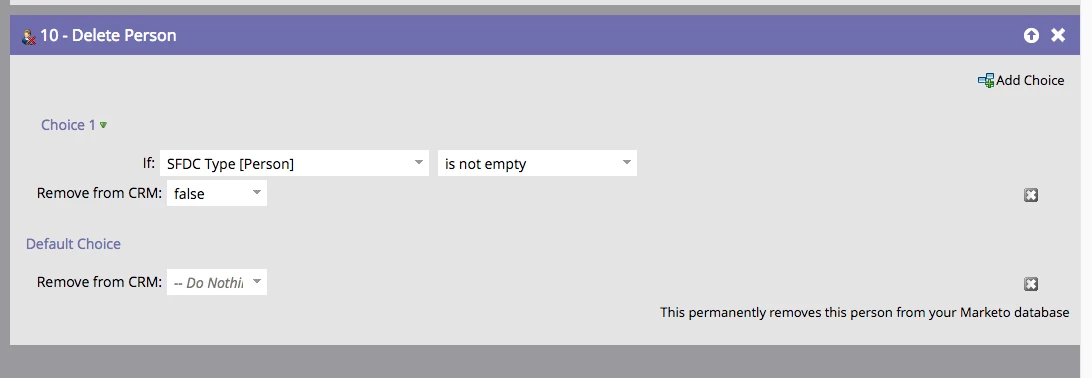
Thanks!!

This post is no longer active and is closed to new replies. Need help? Start a new post to ask your question.
Best answer by Danielle_Wong

What I suspect (99% sure) will happen is that the lead will only be deleted from Marketo if the first choice is matched. If the first choice is not matched, then a 'Do Nothing' flow-step will occur, as is the logic for all other flow steps.

In this case, the lead will be deleted regardless of which choice is matched.


I was able to get some clarification from Marketo that only those Marketo records that have synced to SFDC will be deleted based on how I set up the flow step. In my Marketo instance, not all records are synced to SFDC. So I wanted to ensure that only those that ARE synced to SFDC will be deleted from Marketo and kept in SFDC.

I could have done this in the smart list, if this was the only flow step, however, this is the last flow step of about 8 flow steps. The first 7 flow steps apply to all Marketo records regardless if they are synced to SFDC or not. However, for the last step, I wanted to only delete those in SFDC from Marketo only.

Thanks!

4 replies

AnneMarie_C
Adobe Employee
Adobe Employee
March 13, 2019

Setting Remove from CRM to false is the correct way to do this. Also, keep in mind that the next time the record is updated in Salesforce it will sync back down to Marketo and create a new record. You will need to find a way to stop records you deleted in Marketo from being visible to the sync user, either through visibility rules or asking Support to set up a sync filter.

Danielle_Wong
Community Advisor
Community Advisor
March 13, 2019

Thanks AnneMarie!

I also wanted to just make sure the choice I set works as expected. I only want to delete from Marketo if the record exists in SFDC. Which, not all of my Marketo records are in SFDC. So that's why I put that choice in there.

Thanks!

Danielle W.
Level 6
March 13, 2019

Agree with Danielle.

Kenzie_Caldwell
Level 2
March 13, 2019

The flow is correct. This flow step will always delete a record in Marketo. The add choice in this flow step only indicates if the record will or won't also be deleted from Salesforce.

The important piece to mention is that 100% of the records that qualify for this campaign will be deleted, so ensure the smart list of this smart campaign is only pulling in records in Salesforce. It may be safer to build it as follows:

  • Smart List:
    • SFDC Type is not empty and
    • (whatever other criteria you need)
  • Flow:
    • Delete Person (Remove from CRM = False)
Nicholas_Manojl
Level 8
March 14, 2019

Hi Kenzie,

I want to say this is incorrect but you've made me think about this, because the UI is a bit weird.

What I suspect (99% sure) will happen is that the lead will only be deleted from Marketo if the first choice is matched. If the first choice is not matched, then a 'Do Nothing' flow-step will occur, as is the logic for all other flow steps.

SanfordWhiteman
Level 10
March 14, 2019

What I suspect (99% sure) will happen is that the lead will only be deleted from Marketo if the first choice is matched. If the first choice is not matched, then a 'Do Nothing' flow-step will occur, as is the logic for all other flow steps.

In this case, the lead will be deleted regardless of which choice is matched.

Nicholas_Manojl
Level 8
March 14, 2019

This side discussion abut the Do Nothing flow step..

It's time to test.

Here's my leads I've qualified for my campaign:

Here's my flow:

Here's the expected result:

1. We either delete both leads, but only remove one from the CRM.

2. We only delete the 1st lead and the second lead passes through a 'Do Nothing' step.

Here's the actual result:

It looks like my initial hypothesis was correct.

SanfordWhiteman
Level 10
March 14, 2019

The confusion is whether the Delete from CRM = false step represents Do Nothing, which is what Kenzie was getting at. It does not.

Danielle_Wong
Community Advisor
Community Advisor
March 15, 2019

Hi Sanford,

I'm not sure you are understanding my original question. But anyway, here is the explanation on the flow that I've confirmed with Marketo:

Delete from CRM = False step definitely doesn't mean "do nothing". The intention of the section the first screenshot is that when someone meets the Criteria "SFDC Type is not empty" they WILL BE DELETED from Marketo, but NOT my CRM.

Everyone else will not be deleted from Marketo or my CRM.

Initially, I was confused on the Default Choice; whether the person would still be deleted or not. But it does make sense to me now, that, it is doing what I had intended it to do, which is that nothing will happen to records with SFDC Type is empty.

Danielle W.