
Jennifer_Braath
Level 2
January 12, 2018
Question

Is it possible to move the subscription center to a new workspace?

  • January 12, 2018
  • 1 reply
  • 3644 views

We just added workspaces and partitions to our instance and I want to move the existing subscription center to a new workspace called Global Workspace.  Until recently, we have had just 1 division using Marketo, so all operational programs are in this single workspace.  We will be onboarding new divisions over the coming months, so I want to move the global operational programs (like Subscription center) to the Global workspace.  The current workspace and Global workspace are both using the default partition.

I have done the following:

  • Disabled all of the live subscription center smart campaigns and unapproved the assets
  • Removed references to these assets in other smart campaigns
  • Tried to move the Subscription folder to the Global Workspace. It tried to move it however failed due to existing references to the subscription center

:
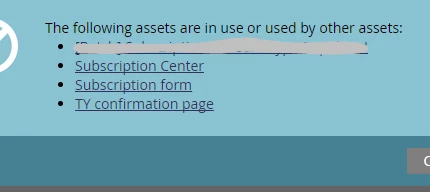
I have removed all references that I can find to the 3 assets above however it still fails and I am wondering if it is even possible to move the subscription center since it has been live for over a year.

Does anyone know how to do this or if it can be done?
Thanks!
Jennifer

This post is no longer active and is closed to new replies. Need help? Start a new post to ask your question.

1 reply

Diederik_Marte4
Level 4
January 12, 2018

Hi Jennifer,

Moving programs can be a pain sometimes.

1. Make sure the form is within the program and not in design studio. This way the cloned program won't reference a form in a different workspace.

2. I still see pages (and maybe emails). A page is based on a template. That template is propably in Design Studio in that other workspace. You have two options:

          A. Put that template in a folder and share that folder with the workspace you are migrating too. I think that could fix your issue, but I'm not 100% sure.

          B. You clone the needed email and page templates to a folder in the new workspace. Then share that folder with your current workspace. Then update your email center's assets with that new template. Now your center is using templates from the new workspace, so you should be able to move your program to the new workspace (with that I mean, you can move the folder that contains your program. That's even better than cloning).

Good luck!

Diederik

6x Marketo Champion | Marketo Certified Solutions Architect (MCSA) | Marketo User Group Leader | International Speaker on Marketing Technology
Jennifer_Braath
Level 2
January 17, 2018

Thanks so much Diederik!

Your suggestions were helpful and I have managed to get through the association errors however now I am faced with a new challenge. 

When I move the folder (drag and drop the folder with the subscription center program from the current workspace to the new Global workspace), I get this new error and I don't know how to resolve it.  I am hoping you might have a suggestion?

Thanks in advance!

Jennifer

Diederik_Marte4
Level 4
January 22, 2018

Hi Jennifer,

I haven't seen that error before. You could try to remove that line and recreate it after moving. Else I'd suggest contacten support to get some context.

6x Marketo Champion | Marketo Certified Solutions Architect (MCSA) | Marketo User Group Leader | International Speaker on Marketing Technology