Is it good to use "Activity Logged" as a filter to determine if a contact/Lead are engaged | Community
Skip to main content
Level 1
November 10, 2022
Solved

Is it good to use "Activity Logged" as a filter to determine if a contact/Lead are engaged

  • November 10, 2022
  • 2 replies
  • 3583 views

Does anyone use "Activity Logged" as a filter in a Smart List determine if a contact/lead is active or engaged or not? It seems problematic as it appears that a lot of things that have little to do with engagement are logged. I am working with an inherited instance of Marketo and there is a smart list of "All Marketable Persons - Active Past 12 Months" and it uses that as a filter (among others that are valid.)


Does anyone have a smart list to create a list engaged contacts they'd be willing to share?

This post is no longer active and is closed to new replies. Need help? Start a new post to ask your question.
Best answer by Darshil_Shah1

I think you're talking about the "Activity was Logged" filter which is the SFDC filter and determines if there are any tasks or events at the activity level for a person or not. "Activity was Logged" filter only sees the "Tasks" and "Events" that exist in Salesforce. Anything else that shows up in the SFDC Lead/Contact's activity history is not seen by that filter unless it is also a task or event in Salesforce.


I don't think you should use that filter to determine if the person is engaged/active or not. You should rather be using lead activity filters - e.g., "Filled Out Form", "Visited Webpage", etc. in your SL to filter out people who're engaging with your marketing assets. Following is the SL configuration that we used in the past, FYR -
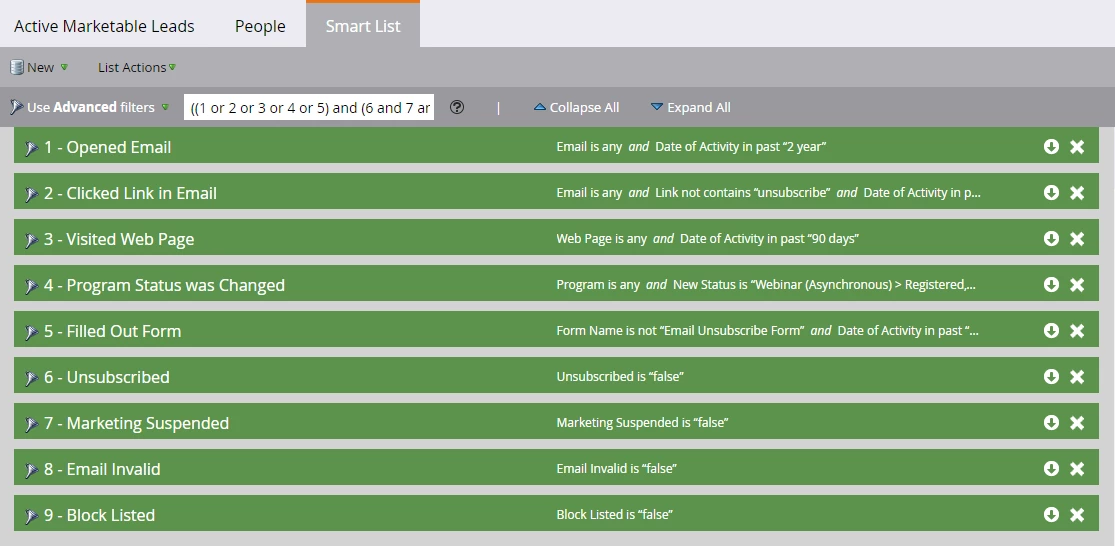
Basically, you'd want to include the filters for identifying any person activities logged as a result of their action v.s. the activity that was logged as a result of your marketing efforts, you'd not want to include Was Sent Email as that's not a good example of something that prospect engagement, it merely shows that you sent out an email. One more thing, since you'd be creating a SL that references the lead activity log, you should also be cognizant of Marketo's data retention policies for high volume and normal activities listed on this page here.


Please let us know if you have any questions. 


2 replies

Darshil_Shah1
Community Advisor and Adobe Champion
Darshil_Shah1Community Advisor and Adobe ChampionAccepted solution
Community Advisor and Adobe Champion
November 11, 2022

I think you're talking about the "Activity was Logged" filter which is the SFDC filter and determines if there are any tasks or events at the activity level for a person or not. "Activity was Logged" filter only sees the "Tasks" and "Events" that exist in Salesforce. Anything else that shows up in the SFDC Lead/Contact's activity history is not seen by that filter unless it is also a task or event in Salesforce.


I don't think you should use that filter to determine if the person is engaged/active or not. You should rather be using lead activity filters - e.g., "Filled Out Form", "Visited Webpage", etc. in your SL to filter out people who're engaging with your marketing assets. Following is the SL configuration that we used in the past, FYR -

Basically, you'd want to include the filters for identifying any person activities logged as a result of their action v.s. the activity that was logged as a result of your marketing efforts, you'd not want to include Was Sent Email as that's not a good example of something that prospect engagement, it merely shows that you sent out an email. One more thing, since you'd be creating a SL that references the lead activity log, you should also be cognizant of Marketo's data retention policies for high volume and normal activities listed on this page here.


Please let us know if you have any questions. 


TjonesAuthor
Level 1
November 12, 2022

That's what I thought thank you for confirming!

Tamera Jones
Darshil_Shah1
Community Advisor and Adobe Champion
November 14, 2022

Cool! You're very welcome. 🙂


Vinay_Kumar
Community Advisor
Community Advisor
November 11, 2022

Agreed with @darshil_shah1 comment. Using activity filters would be the correct approach to identify the active/inactive leads. You can try different activity filters with the correct logic to filter the leads as per your requirement.