
Invalid Image URL | Community
Skip to main content
Monica_Koran
Level 3
July 2, 2018
Solved

Invalid Image URL

  • July 2, 2018
  • 6 replies
  • 12270 views

Hi all-

Wondering if something recently changed in Marketo.  I upload and image file and when I select it in the email to add ALT Text or a Link, it comes up with and "Invalid Image URL" 
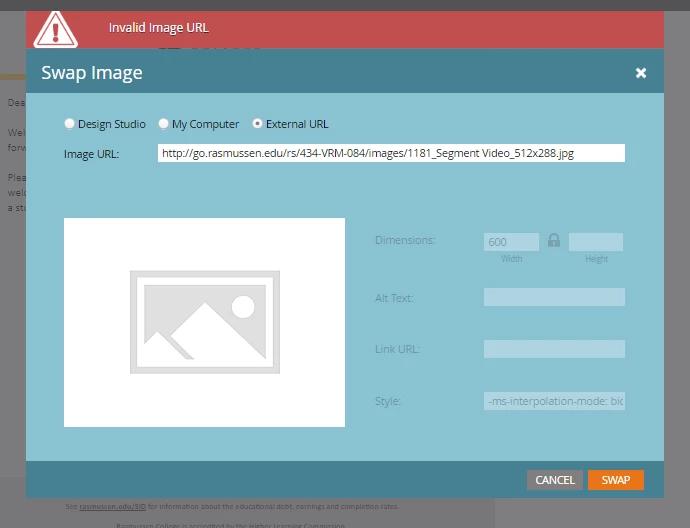
fe

I did recently just get a new computer.  Could that be it?  I have also noticed that now within my Marketo Instance, it looks like the images don't download by default.  Very frustrating, Any thoughts?
This post is no longer active and is closed to new replies. Need help? Start a new post to ask your question.
Best answer by JDNelson1

I had the SAME thing happen to me last week. I cleared all my cache and browser info (Chrome) during the Comcast web issues last week and ever since it was doing that.

For ME -- the resolution was the Chrome Extensions I had installed. Some didn't install fully and others not completely. If you're on chrome I'd make sure you go through those and try turning a bunch off, then back on later and see if you can find which are breaking.

As far as I know that was all related (I haven't had the issue since) but seems like a weird problem -- I thought it was only me.
(I think the culprit was Ghostery)

6 replies

JDNelson1Community AdvisorAccepted solution
Community Advisor
July 2, 2018

I had the SAME thing happen to me last week. I cleared all my cache and browser info (Chrome) during the Comcast web issues last week and ever since it was doing that.

For ME -- the resolution was the Chrome Extensions I had installed. Some didn't install fully and others not completely. If you're on chrome I'd make sure you go through those and try turning a bunch off, then back on later and see if you can find which are breaking.

As far as I know that was all related (I haven't had the issue since) but seems like a weird problem -- I thought it was only me.
(I think the culprit was Ghostery)

Monica_Koran
Level 3
July 9, 2018

Thx @JD Nelson​!  I had recently obtained a new computer and within Chrome, I needed to clear my cache and you are right, it was Ghostery that was causing the problems.  Thanks everyone for your help!

Gerard_Donnell4
Level 9
July 3, 2018

Hi @Monica Koran​,

I had a similar issue with a different platform. It might be because your image is located on a non secure website () whereas the Marketo system is secure (). Marketo might be blocking the image because of that. If it keeps happening, try uploading your image to a secure domain and see if that helps.

Thanks,

Gerard

Community Advisor
July 6, 2018

curious to see how it panned out, @Monica Koran

Dave_Roberts
Level 10
July 6, 2018

Im not sure if this is the case, but I think "I spy with my little eye"... a space in the file name.

If there is indeed a space between "Segment" and "Video" in the filename and you load that to Marketo's Images/Files folder, you might see something like this happening. You can fix this by updating the filename to have a dash or underscore and no spaces, then re-upload it to the Images/Files folder.

Technically, Marketo will replace the space in the URL with a special character (%20) and you'll be able to access the image that way, but I'd say it's best-practice to stay away from images with spaces in the name.

Hope this is helpful.

-Dave

Ronen-Was-SRpro
Level 5
July 7, 2018

Is it related to http vs https?

I had a similar issue and was told that I'm pointing the wrong URL ( I needed to change http to https)

Ronen Wasserman
Frank_Carpenter
Level 2
September 29, 2020

Had the same issue today - here is the answer: In your chrome settings you need to allow na-abc.marketodesigner.com/. It worked perfectly 🙂


Frank CarpenterSr. Marketing Automation ManagerFive9 Inc.(M) 631-561-8837
Glenda_Georgoul
Level 2
September 29, 2020

thank you. I've been having issues for a week. This worked