
Invalid e-mail clean-up: Avoid bi-directional sync | Community
Skip to main content
Ande_Kempf4
Level 4
July 30, 2015
Solved

Invalid e-mail clean-up: Avoid bi-directional sync

  • July 30, 2015
  • 2 replies
  • 3207 views

How would I go about deleting invalid emails from Marketo (not CRM) without the bi-directional sync pushing them back into Marketo?

Right now I have built a smart list with this...smart list:
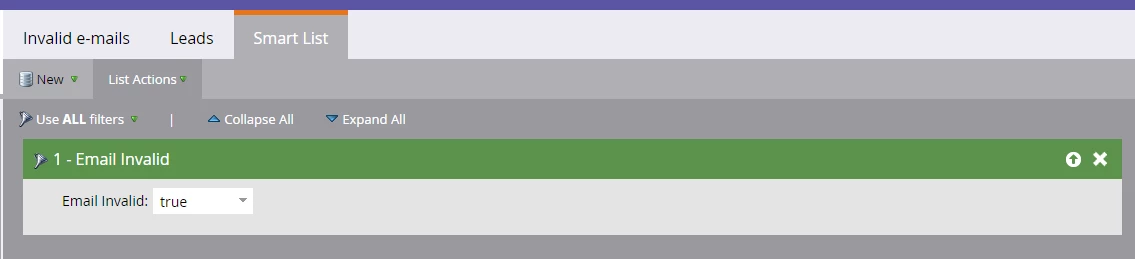
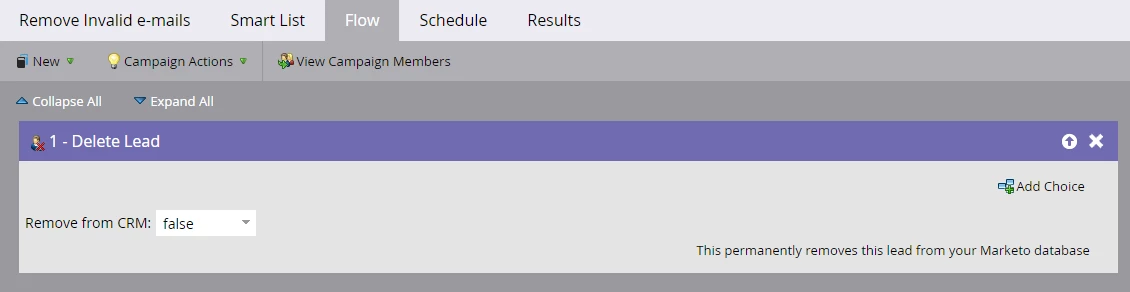
Then I built a smart campaign that looks like this:

Smart List:
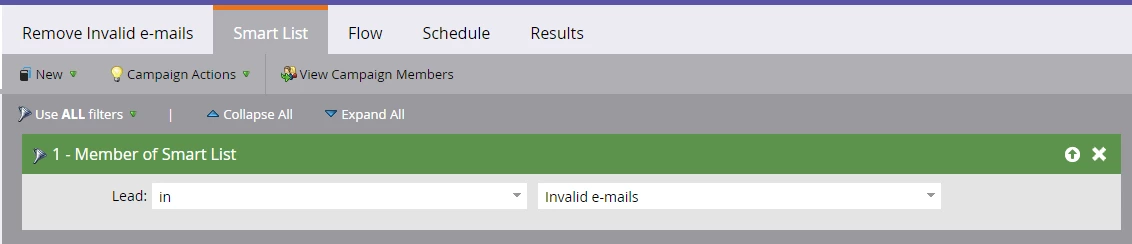
Flow:
This post is no longer active and is closed to new replies. Need help? Start a new post to ask your question.
Best answer by Ande_Kempf4

Hi @Madhu Gulati​,

Thank you for your response!  Did you ever change your sharing rules at all for your sync user in Salesforce to avoid syncing the removed lead back into Marketo?

2 replies

Madhu_Gulati2
Level 2
July 30, 2015

Hi Ande,

Your campaigns look good and we are doing ours the same way. The lead will not sync back to Marketo in this case unless there is an activity with the lead (any change to that lead) in Salesforce. It's also possible to update that lead later with the correct email address in Salesforce.

Hope that reassures you!

Madhu and team

Ande_Kempf4
Ande_Kempf4AuthorAccepted solution
Level 4
July 31, 2015

Hi @Madhu Gulati​,

Thank you for your response!  Did you ever change your sharing rules at all for your sync user in Salesforce to avoid syncing the removed lead back into Marketo?

Madhu_Gulati2
Level 2
July 31, 2015

Hi Ande,

No, we don't usually do it that way. In the future if we get the correct email address for a lead, we want to be able to update it in Salesforce so it can sync back to Marketo.

Level 9
August 4, 2015

Hi Ande

Another thing you might want to consider - we also have a program which looks for an email address changes where Invalid Email is true. If the email address changes, then we change Email Invalid to false.

Otherwise, if someone updates their email in your CRM to the right value, Marketo still won't include them on sends since Email Invalid is marked as True.

Phil

Ande_Kempf4
Level 4
August 4, 2015

Thanks @Phillip Wild​.  Is that an on-going trigger campaign that collects the invalid emails? If so, do you have time frame set on the campaign?

Level 9
August 4, 2015

Hi @Ande Kempf​. It's a triggered campaign that looks for a Data Value change on the Email Address field, where the value changes to a value that isn't blank. In addition, Email Invalid must be True to enter the campaign.

If they meet this criteria, then Email Invalid is marked as False.

We get a lot of bad data that comes through Salesforce (for many reasons), but this is often updated with the correct versions. So the logic is that if a new email address is populated, Email Invalid must be False since we haven't even sent to that address yet. Otherwise, they wouldn't receive anything ever again.

There's no time frame on the campaign - it's ongoing. I hope that helps.