Implementing Google Analytics tracking code in landing pages | Community
Skip to main content
September 26, 2014
Solved

Implementing Google Analytics tracking code in landing pages

  • September 26, 2014
  • 5 replies
  • 2796 views
Hi Everyone,

I would like to install Google Analytics code on Marketo but i am not sure how i should go about with it. Can someone who has implemented this help me out with this.

Thank in advance,
Vinay
This post is no longer active and is closed to new replies. Need help? Start a new post to ask your question.
Best answer by AlokRa4
Hi Vinay,

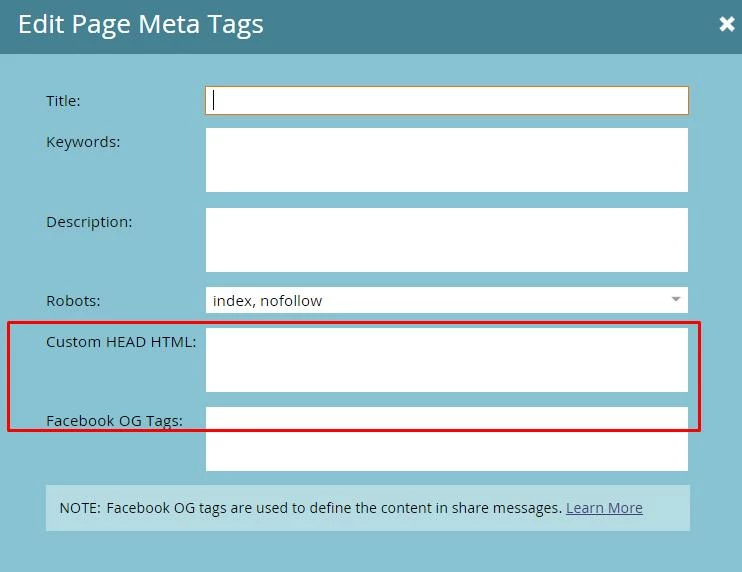
You can implement the Custom Head HTML as the following to a Marketo Landing Page - 

Go to Landing page editor, and drop down options from "Landing Page Options" - Select "Edit Meta Tags". Then, you can add the GA script for the Head HTML.


Hope that helps!

5 replies

AlokRa4Accepted solution
Level 10
September 26, 2014
Hi Vinay,

You can implement the Custom Head HTML as the following to a Marketo Landing Page - 

Go to Landing page editor, and drop down options from "Landing Page Options" - Select "Edit Meta Tags". Then, you can add the GA script for the Head HTML.


Hope that helps!
September 26, 2014
It's also worth mentioning that if you want GA on all pages, it often makes sense to put it in the template.
September 26, 2014
I would put it on the template. No point in having to remember to open every page's custom header to add it. Just add it to your template.

Your standard Marketo template will include a place to put the GA script.
Level 10
September 26, 2014
Absolutely, I second that .
September 29, 2014
Hi Everyone,

Thank you very much for the quick response. 

Regards,
Vinay