If/Then in Velocity Script | Community
Skip to main content
RyanMoravick
Level 4
December 29, 2022
Solved

If/Then in Velocity Script

  • December 29, 2022
  • 1 reply
  • 5346 views

I am creating a Velocity Script for an email and would like to only show the script to users who have the custom objects in the script available. I am new to scripting but is there an if/then statement that can be used to say "if this custom object doesn't exist for a user, do not show the script"? Thank you!

This post is no longer active and is closed to new replies. Need help? Start a new post to ask your question.
Best answer by Darshil_Shah1

Please start by providing actual code, not a screenshot. A screenshot is not useful for troubleshooting.


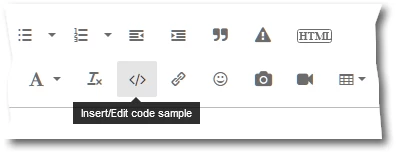
When pasting code, highlight it as Java (closest we have to Velocity syntax) using the Insert/Edit Code Sample button:


Well, you have a bunch of items I mentioned in my previous comment to think through before you finalize your custom object structure and the velocity script. But, checking for null values along with isEmpty() function should solve your initial query of why you're seeing additional rows in your email even though you don't have any data for those product fields (e.g., product, quantity4, etc.)


#if(cartAbandonment_cList.get(0).prod1 && !cartAbandonment_cList.get(0).prod1.isEmpty()) ##Display something #end


The above is just sample script to show how'd set your if condition so you take care of both null and empty "" values. Also, ideally, you should sort your CO list in the desired order before accessing the objects/loop through the list to pick the correct CO record based on a field. In general, accessing any random custom object record w/o sorting the custom object list isn't a good idea.

 

1 reply

Darshil_Shah1
Community Advisor and Adobe Champion
December 29, 2022

You can use the size() function to determine if there are CO records or not for an associated person. The script would go something like below -

#if($test_CBC_cList.size()>0) //Replace "test_CBC_c" with the API name of your CO Non-Zero CO records #else Zero CO records #end

Hope this helps.


SanfordWhiteman
Level 10
December 30, 2022

I like to use isEmpty():

#if( !$myList.isEmpty() ) ## the list exists and has > 0 items #end

List.isEmpty() is overloaded and is the same as checking the size.


If the list dos not exist at all,  size() will throw a fatal error; in the same situation, isEmpty() will fail silently, though it’s impossible to say which option is universally better. You can explicitly check the existence of the list first:

#if( $myList && !$myList.isEmpty() ) ## the list exists and has > 0 items #end


Darshil_Shah1
Community Advisor and Adobe Champion
December 30, 2022

Thank you, Sandy. I liked the idea of checking if the list exists or not in the first place!