Solved
.ics file token problem
I've created a .ics file token using the .ics token creator, and I'm trying to add tokens into the description.
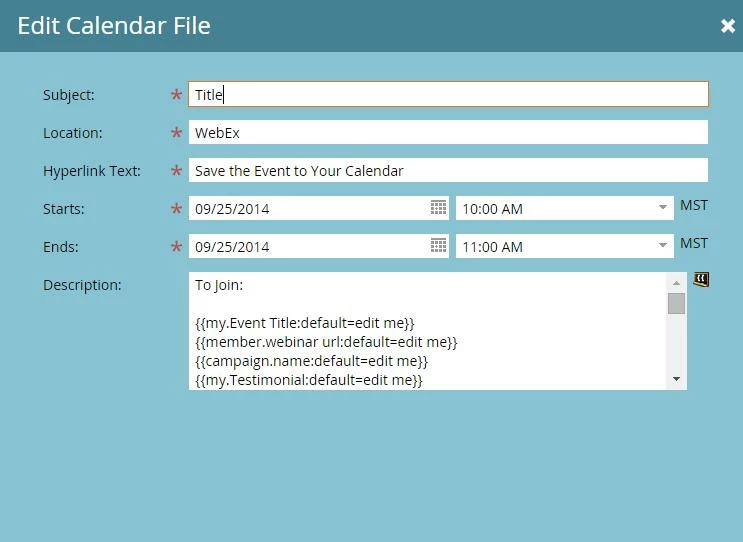
The token is being carried through to the "thank you for registering" email and landing page just fine, but the tokens within the description of the .ics token are not being rendered properly.
When I register for the event and look at the open the .ics fil linked to in the email, the tokens still show up as the name of the token, not the token's content. I threw a bunch of tokens into the description to check if it was just a problem with the particular token I was trying to use, but none of the tokens are working.
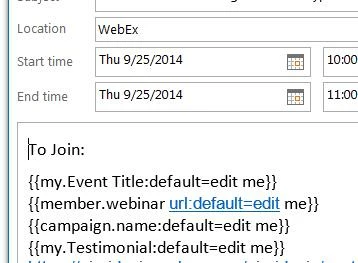
I've looked at other discussions here, but they aren't poinging me towards any solution. It seems to me that I'm doing everything right, but something must be going wrong since the tokens aren't working within the description of the .ics file.
Has anyone else had this experience and found a solution? Is there some obvious thing that I'm just missing?
The token is being carried through to the "thank you for registering" email and landing page just fine, but the tokens within the description of the .ics token are not being rendered properly.
When I register for the event and look at the open the .ics fil linked to in the email, the tokens still show up as the name of the token, not the token's content. I threw a bunch of tokens into the description to check if it was just a problem with the particular token I was trying to use, but none of the tokens are working.
I've looked at other discussions here, but they aren't poinging me towards any solution. It seems to me that I'm doing everything right, but something must be going wrong since the tokens aren't working within the description of the .ics file.
Has anyone else had this experience and found a solution? Is there some obvious thing that I'm just missing?