I removed these people from flow, but they're still getting our nurture emails | Community
Skip to main content
Dianna_Sadler
Level 2
February 13, 2019
Solved

I removed these people from flow, but they're still getting our nurture emails

  • February 13, 2019
  • 5 replies
  • 16566 views

Hello,

I created a nested program within a cadence stream for our Marketo nurture, but mid-way, (after 2 sends) we decided we needed to stop marketing to these people. I thought that by removing everyone from the flow, it would solve the problem, but this morning, we sent out the 3rd email.

There's no pause since I created as a campaign send (see NU/2019-02-01/Clean up Nurture). Can someone help me figure this out so I don't send a 4th email out?
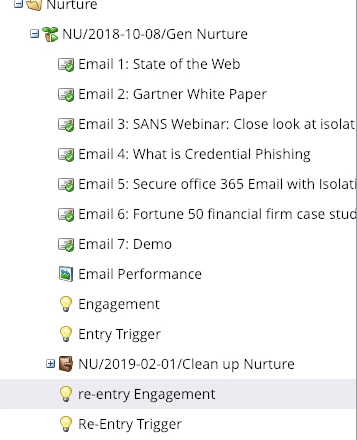
thanks!

This post is no longer active and is closed to new replies. Need help? Start a new post to ask your question.
Best answer by AnkitDu3

I feel the best option will be to stop the Nurture and check the batch campaign again and also in the flow step ahead of wait " add remove people from flow ( the email address which you want to remove" ) to be double sure here.

5 replies

Level 6
February 13, 2019

Have you tried turning the program status "off" in the Setup Tab.

Dianna_Sadler
Level 2
February 13, 2019

there are others in the nurture that we might want to send ot (just a

subset we don't)

On Wed, Feb 13, 2019 at 12:24 PM Ankit D <marketingnation@marketo.com>

Stephen_Schmuhl
Level 2
February 13, 2019

You could try going into the Members tab and removing them individually using the Change Status to "Not in Program". Otherwise, I might review the triggered smart campaigns that you have adding members to the program because even if you removed them, the smart campaign may be adding them back in each time it runs.

Grace_Brebner3
Level 10
February 13, 2019

Hey Dianna,

When you say you "remov[ed] everyone from the flow", do you mean you ran a smart campaign with the "remove from flow" step?

This is a flow step that's often misunderstood (I've explained how it works in this thread: Remove from Flow Campaign Explanation​).

Can you share some screenshots of your smart campaigns?

Dianna_Sadler
Level 2
February 13, 2019

HI Grace, I sent another post above with more details. Hopefully this helps.

Dianna_Sadler
Level 2
February 14, 2019

I did run it as a batch in the stream - I think I figured out my issue.

Now, how do stop it from sending again? Is the best just to turn off the entire engagement stream completely? (not against doing that since we wanted to revamp anyway)?

If so, what's the best way to ensure we're no longer sending out any more emails?

Thanks everyone for all your help!

Dianna

On Thu, Feb 14, 2019 at 8:42 AM Dianna Sadler <

Ash_Chandler1
Level 1
February 14, 2019

Hi Dianna,

I hope you have fixed this by the time you see my reply but just in case, here is a fix for your issue.

In your Smart Campaign that is sending the emails, before the next Send Email step (email 4 I think you refer to) OR to be safe, before each of the Send Email steps in the Flow, add a "Remove from flow" flow step which says if anyone is a member of that Smart Campaign, remove them from the flow. This will mean that anyone in the flow will be removed once they are released from the wait steps.

The issue with nesting programs into Engagement Streams is that, once the contacts enter the Smart Campaign in the programs, past the Smart List and into the Flow, the controls offered by the Engagement Program (i.e. removing member from engagement program, pausing cadence, turning the Engagement Program off etc.) do not work. Effectively the people enter the Nested Program and then it takes over in terms of timings.

You need to get them out of the Smart Campaign specifically. Nested programs can be really problematic, but the power they offer makes them worth it!

Sorry if I have not understood your problem or am not helping here...

Denise_Greenb12
Level 6
February 14, 2019

Hi Dianna,

Ash is right. Pausing people in the Engagement who are already in the flow of that Smart Campaign won't stop them. This is an unusual setup. Here's what I would do:

1) Deactivate the Program in the stream.

2) Create and run a smart campaign that removes from flow anyone in that Smart Campaign that you don't want to send to.

3) Then rebuild the mechanisms for getting people into that third stream. Are there any other email or nested programs in that 3rd stream? Or is that the only one?

4) You stated the reason for using the nested program was to prevent people from receiving and email they had already received before. The nested program will not accomplish that unless you first make anyone who previously received the email a member of the nested program. See Adding a Program to an Engagement Program Stream - Marketo Docs - Product Documentation

5) If the emails that you're trying to avoid people from receiving again are dragged into the 3rd stream (instead of the nested program) - that is - they are the same emails - NOT CLONES - then the Engagement Program will not re-send them to previous recipients.

6) If you use a nested program, don't put anything in the send email campaign other than "Member of Engagement Program is True." Use separate campaigns to add/pause/resume people from the Engagement Program.

7) Normally, I would create a separate nested email program for each email rather than one with a smart campaign and several send email flow steps with waits in between. I use the Engagement Stream cast to control when each email is sent. The separate email program per email is how you prevent someone from receiving a clone of an email she already received for receiving an offer for an asset that she already download from another source). This also gives you the ability to pause or resume people in the stream because they aren't buried inside wait steps in a campaign.

I hope the above helps.

Denise

AnkitDu3Accepted solution
Level 6
February 14, 2019

I feel the best option will be to stop the Nurture and check the batch campaign again and also in the flow step ahead of wait " add remove people from flow ( the email address which you want to remove" ) to be double sure here.

Dianna_Sadler
Level 2
February 15, 2019

So i've stopped the entire engagement stream and added a flow step of wait for all.

I've also created a smart campaign to the pause from campaign per some people's suggestion, it only paused 7,000 people, a subset of the entire batch campaign list - so I don't think that solution helped.

Hopefully me just turning off the entire engagement stream and adding a remove flow step before the emails and removing the emails from the smart campaign will do the trick - however what i'm worried about is the fact that the smart batch campaign is acting as a separate agent within the engagement stream.

thanks for everyone's help.

Frank_Carpenter
Level 2
February 15, 2019

Hi Dianna,

All you need to do is identify the people you want to remove and set the program status to "Not in Program". That removes them from the engagement program and they will not be evaluated in the next cast. Here is an example:

I use this method to remove unsubscribed people, invalid email addresses and people in my own company that should not be in the nurture.

I hope this helps :-)

Frank

Frank CarpenterSr. Marketing Automation ManagerFive9 Inc.(M) 631-561-8837