I don't see the embed option on my forms | Community
Skip to main content
April 21, 2015
Solved

I don't see the embed option on my forms

  • April 21, 2015
  • 7 replies
  • 2031 views
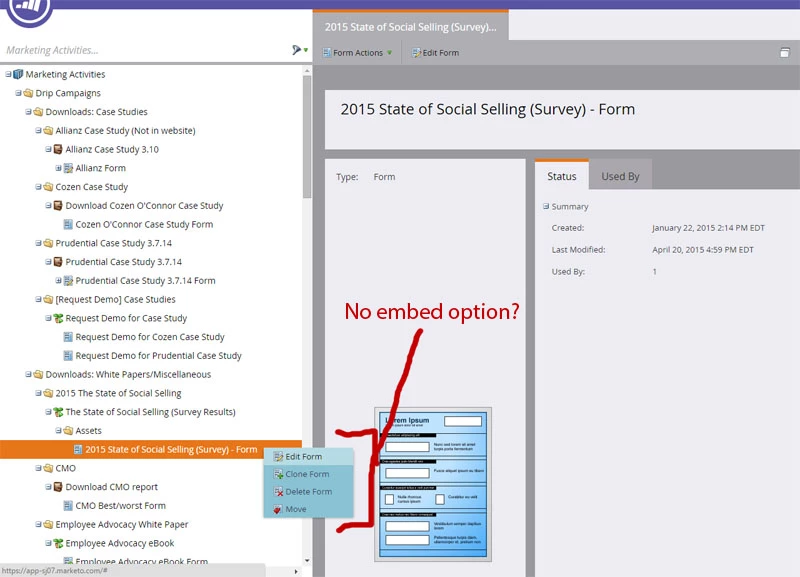
I need to move some forms to outside web pages, but I can not find the embed option on all of the forms. Some have it, and some don't. I don't see the embed option when right-clicking the form in the tree menu or when clicking the "Form Actions" dropdown menu. Why is this happening and how do I change it so that I will be able to see the embed option on all of these forms?
This post is no longer active and is closed to new replies. Need help? Start a new post to ask your question.
Best answer by alex.stanton
Hi Josh, 

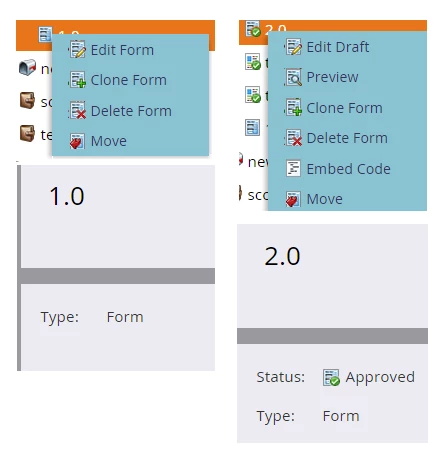
It looks like the form was created using the original editor. You can tell because (1) you do not have the option to approve and (2) you have no Status in the Summary panel. 

In order to embed a Form 1.0 you need to place it on a blank landing page and copy the html. Here are the instructions on what to do: https://community.marketo.com/MarketoResource?id=kA650000000GvdjCAC


7 replies

April 21, 2015
You need to approve the form first and then the Embed function will show.
April 21, 2015
This is my first time navigating the marketo stuff for any company and I can't find where the option is to approve the form. If I make a new form I see the option to approve it in the same spots where the embed option would be, but these existing forms don't have the option to approve or embed. All I see are 'edit', 'clone', 'delete', and 'move' options as seen in the image I attached to the first post. Is there somewhere else you can go to approve a form? These forms existed before I ever came along, is there something that may have been done to them to make them unapprovable?
April 21, 2015
.
April 21, 2015
Do you have someone who acts as the Marketo Admin for your company? If so, I would check with them to see what permissions you have set in Marketo. It may be that you do not have sufficient permissions to approve assets. It's quite common for Admins to do this to prevent campaigns from deploying without being reviewed. 
April 21, 2015
The user I am logged in as has their role set to admin and the description says "All permissions", so that shouldn't be the problem. Any other ideas?
April 21, 2015
Assuming your permissions are correct - How about try editing the form (but not really making changes)? It should put it into draft mode so you can approve and then the embed option should show?
alex.stantonAccepted solution
Level 7
April 22, 2015
Hi Josh, 

It looks like the form was created using the original editor. You can tell because (1) you do not have the option to approve and (2) you have no Status in the Summary panel. 

In order to embed a Form 1.0 you need to place it on a blank landing page and copy the html. Here are the instructions on what to do: https://community.marketo.com/MarketoResource?id=kA650000000GvdjCAC