Hyperlinks | Community
Skip to main content
June 16, 2015
Solved

Hyperlinks

  • June 16, 2015
  • 2 replies
  • 3011 views

i want to create a newsletter with a hyperlinked side panel - how do you add hyperlinks into the text?

This post is no longer active and is closed to new replies. Need help? Start a new post to ask your question.
Best answer by Ravi_Ansal2

Hi Sarah Goodchild​,

You can try Targets in Anchor tags,

They are real simple just highlight the text and PRESS "CRTL + K" or if you still cannot do that just highlight the text and click on the Highlighted Button Below:
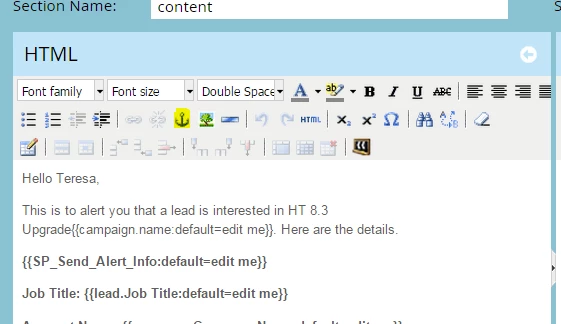
And to scroll on the same page Try:

<a href="#option1" >Enter the LINK/a>

<div id="option1">Scrool down to text here</div>

Let me know if this works

2 replies

Srujan_Vishwana
Level 4
June 16, 2015

Highlight the test which you want to hyper link and click on the icon which looks like a small chain link (image attached) and paste the link you want the text to be directed to.

Hope it helps!

Sru

June 16, 2015

Hi Sru

I tried that I don't think it is working.

Maybe I have described it wrong. I want to hyperlink to certain sections within the newsletter - so that the reader can jump to the correct section without scrolling down the page. Following your instructions, it keeps trying to open a new web page.

Any ideas?

Sarah

June 16, 2015

Hi Sarah,

You can use the anchor button to accomplish this. It can be found when you edit a rich text box.

Mike

Ravi_Ansal2
Ravi_Ansal2Accepted solution
Level 5
June 16, 2015

Hi Sarah Goodchild​,

You can try Targets in Anchor tags,

They are real simple just highlight the text and PRESS "CRTL + K" or if you still cannot do that just highlight the text and click on the Highlighted Button Below:

And to scroll on the same page Try:

<a href="#option1" >Enter the LINK/a>

<div id="option1">Scrool down to text here</div>

Let me know if this works