HTML issue | Community
Skip to main content
Jeremy_Gendelma
Level 2
September 27, 2019
Question

HTML issue

  • September 27, 2019
  • 2 replies
  • 2298 views

First a disclaimer: I am admittedly still a beginner in HTML.

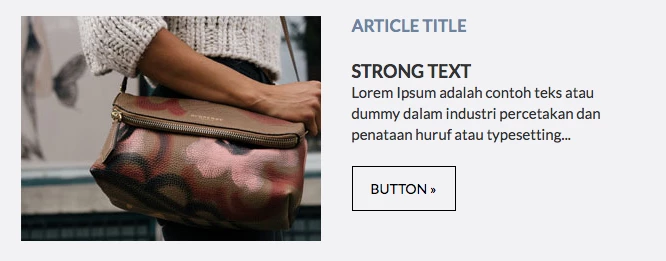
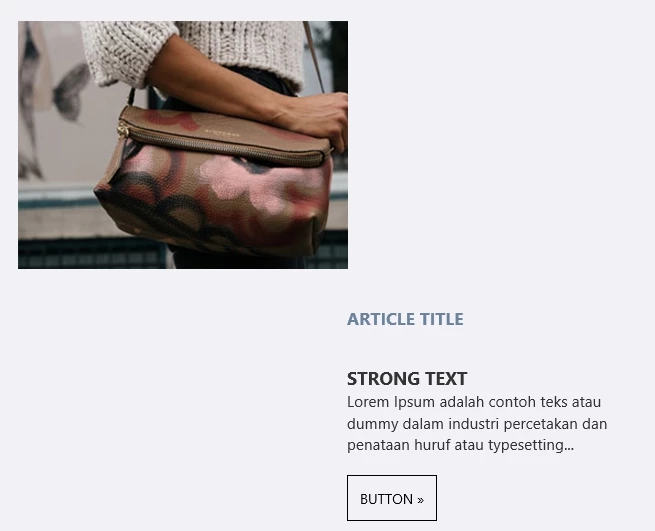
We have 1 specific email module that is displaying badly in certain email clients. The first screenshot below is how it should look, the 2nd is how it is rendering in a handful of clients - particularly outlook. Looks to me like the image container is being pushed out, causing the two side-by-side blocks to overlap, causing the text block to get pushed down to the next line. Anyone know what changes I should try in the HTML in order to fix this? Thank you in advance!
This post is no longer active and is closed to new replies. Need help? Start a new post to ask your question.

2 replies

SanfordWhiteman
Level 10
September 27, 2019

You must include (and highlight using the Syntax Highlighter) the relevant fragments of your code for questions like this.

Jeremy_Gendelma
Level 2
October 8, 2019

Sorry about that. Here is the code for the module:

<table role="presentation" id="articleae3cd6ca-f6ab-40ba-b4ca-ffa49502db63" style="-webkit-text-size-adjust: 100%; -ms-text-size-adjust: 100%; mso-table-lspace: 0pt; mso-table-rspace: 0pt; border-spacing: 0; border-collapse: collapse;" align="center" border="0" cellpadding="0" cellspacing="0" width="100%" class="mktoModule m_article" mktoname="Left-IMG-no-button"> 
<tbody>
<tr>
<td style="-webkit-text-size-adjust: 100%;-ms-text-size-adjust: 100%;mso-table-lspace: 0pt;mso-table-rspace: 0pt;word-break: break-word;-webkit-hyphens: none;-moz-hyphens: none;hyphens: none;font-family: 'Lato', 'Lucida Grande', 'Trebuchet MS', sans-serif;border-collapse: collapse;background-color:${articleBackgroundColor};" bgcolor="${articleBackgroundColor}" valign="top">
<center>
<table role="presentation" class="table600" style="-webkit-text-size-adjust: 100%; -ms-text-size-adjust: 100%; mso-table-lspace: 0pt; mso-table-rspace: 0pt; border-spacing: 0; border-collapse: collapse; margin-top: 0; margin-right: auto; margin-bottom: 0; margin-left: auto;" align="center" border="0" cellpadding="0" cellspacing="0" width="100%">
<tbody>
<tr>
<td style="-webkit-text-size-adjust: 100%; -ms-text-size-adjust: 100%; mso-table-lspace: 0pt; mso-table-rspace: 0pt; word-break: break-word; -webkit-hyphens: none; -moz-hyphens: none; hyphens: none; font-family: 'Lato', 'Lucida Grande', 'Trebuchet MS', sans-serif; border-collapse: collapse;">
<table role="presentation" class="table1-2" style="-webkit-text-size-adjust: 100%; -ms-text-size-adjust: 100%; mso-table-lspace: 0pt; mso-table-rspace: 0pt; border-spacing: 0; border-collapse: collapse;" align="left" border="0" cellpadding="15" cellspacing="0" width="330">
<tbody>
<tr>
<td class="image" style="-webkit-text-size-adjust: 100%; -ms-text-size-adjust: 100%; mso-table-lspace: 0pt; mso-table-rspace: 0pt; word-break: break-word; -webkit-hyphens: none; -moz-hyphens: none; hyphens: none; font-family: 'Lato', 'Lucida Grande', 'Trebuchet MS', sans-serif; border-collapse: collapse;">
<div style="display:inline-block" class="mktoImg" mktoname="Photo" id="photo1ae3cd6ca-f6ab-40ba-b4ca-ffa49502db63" mktolockimgsize="true" mktolockimgstyle="false">
<a href="https://www.theceshop.com/real-estate-community-impact-video?utm_campaign=pre_us0_mkt_eml_not_cop_ces_nrt_any_nsl_u*Pre-Nurture-EM1&amp;marketingcode=pre_us0_mkt_eml_not_cop_ces_nrt_any_nsl_u*Pre-Nurture-EM1&amp;utm_source=marketo&amp;utm_medium=email" target="_blank"><img src="http://templates.marketo.net/newsletter7/article1.jpg" alt="Photo" style="-ms-interpolation-mode: bicubic; outline: none; border-right-width: 0; border-bottom-width: 0; border-left-width: 0; text-decoration: none; border-top-width: 0; max-width: 100%; line-height: 100%; height: auto; width: 330px; display: block;" width="330" /></a>
</div> </td>
</tr>
</tbody>
</table>
<table role="presentation" class="table1-2" style="-webkit-text-size-adjust: 100%; -ms-text-size-adjust: 100%; mso-table-lspace: 0pt; mso-table-rspace: 0pt; border-spacing: 0; border-collapse: collapse;" align="right" border="0" cellpadding="0" cellspacing="0" width="310">
<tbody>
<tr>
<td style="-webkit-text-size-adjust: 100%; -ms-text-size-adjust: 100%; mso-table-lspace: 0pt; mso-table-rspace: 0pt; word-break: break-word; -webkit-hyphens: none; -moz-hyphens: none; hyphens: none; font-family: 'Lato', 'Lucida Grande', 'Trebuchet MS', sans-serif; border-collapse: collapse;">
<table role="presentation" class="contents" style="-webkit-text-size-adjust: 100%; -ms-text-size-adjust: 100%; mso-table-lspace: 0pt; mso-table-rspace: 0pt; border-spacing: 0; border-collapse: collapse;" align="center" border="0" cellpadding="0" cellspacing="0" width="90%">
<tbody>
<tr>
<td class="hide-phone" style="-webkit-text-size-adjust: 100%;-ms-text-size-adjust: 100%;mso-table-lspace: 0pt;mso-table-rspace: 0pt;word-break: break-word;-webkit-hyphens: none;-moz-hyphens: none;hyphens: none;font-family: 'Lato', 'Lucida Grande', 'Trebuchet MS', sans-serif;border-collapse: collapse;line-height:${articleSpacer};font-size:${articleSpacer};" height="${articleSpacer}"> </td>
</tr>
<tr>
<td class="primary-font title" style="-moz-hyphens: none;-webkit-text-size-adjust: 100%;mso-table-lspace: 0pt;mso-table-rspace: 0pt;word-break: break-word;-webkit-hyphens: none;-ms-text-size-adjust: 100%;hyphens: none;font-family:'Lato', 'Lucida Grande', 'Trebuchet MS', sans-serif;line-height: 1.2; font-size: 18px;font-weight: bold;color: #333333;border-collapse: collapse;padding-top:0px;">
<div class="mktoText" mktoname="Right Title" id="title41ae3cd6ca-f6ab-40ba-b4ca-ffa49502db63">
<span style="font-size: 17px; color: #6c839e; line-height: 1.2;">ARTICLE TITLE</span>
</div> </td>
</tr>
<tr>
<td style="-webkit-text-size-adjust: 100%;-ms-text-size-adjust: 100%;mso-table-lspace: 0pt;mso-table-rspace: 0pt;word-break: break-word;-webkit-hyphens: none;-moz-hyphens: none;hyphens: none;font-family: 'Lato', 'Lucida Grande', 'Trebuchet MS', sans-serif;border-collapse: collapse;line-height:${articleSpacer2};font-size:${articleSpacer2};" height="${articleSpacer2}"> </td>
</tr>
<tr>
<td class="primary-font text" style="-moz-hyphens: none;-webkit-text-size-adjust: 100%;mso-table-lspace: 0pt;mso-table-rspace: 0pt;word-break: break-word;-webkit-hyphens: none;-ms-text-size-adjust: 100%;hyphens: none;font-family:'Lato', 'Lucida Grande', 'Trebuchet MS', sans-serif;color: #333333;font-size: 14px;line-height: 1.2; border-collapse: collapse;">
<div class="mktoText" mktoname="Right Text" id="text21ae3cd6ca-f6ab-40ba-b4ca-ffa49502db63">
<strong><span style="font-size: 18px; color: #333333;">STRONG TEXT</span></strong>
<br />
<span style="font-size: 15px; line-height: 1.4;">Lorem Ipsum adalah contoh teks atau dummy dalam industri percetakan dan penataan huruf atau typesetting...<br /><br /> <a href="www.theceshop.com" target="_blank" class="primary-font button" style="-webkit-text-size-adjust: 100%; -ms-text-size-adjust: 100%; display: inline-block; font-size:
14px; font-family: 'Lato', 'Lucida Grande', 'Trebuchet MS', sans-serif; color: #000000; background-color: #f2f2f5; text-decoration: none; padding: 12px 18px 12px 18px; border: 1px solid #000000;"
>
BUTTON »</a></span>
</div> </td>
</tr>
</tbody>
</table> </td>
</tr>
</tbody>
</table> </td>
</tr>
</tbody>
</table>
</center> </td>
</tr>
</tbody>
</table>
Amit_Jain
Community Advisor
Community Advisor
October 9, 2019

Try resizing the image to the exact width i.e. 330px and then use in the email. Outlook takes the actual width of the image.