
Solved
HTML Editing Landing Page
Hi All,
The next question for you all is: I am creating a landing page as a clone from LP template.
Can I know how to edit the HTML coding? I don't see it anywhere. And also how can I bring these images closer?
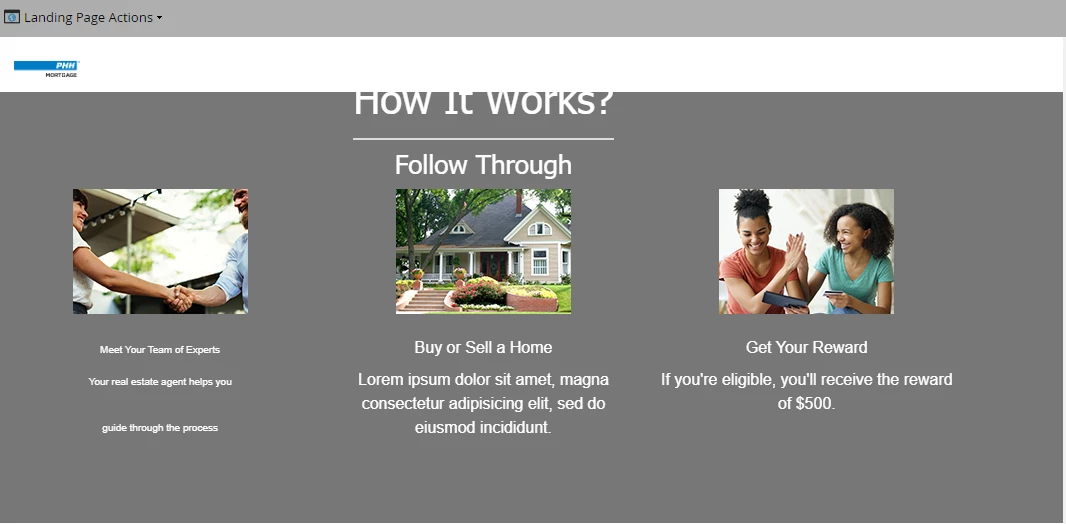

Hi All,
The next question for you all is: I am creating a landing page as a clone from LP template.
Can I know how to edit the HTML coding? I don't see it anywhere. And also how can I bring these images closer?
Code for header: scroll to the bottom
<head>
<meta charset="utf-8">
<title>Landing Page</title>
<meta name="author" content="">
<meta name="keywords" content="">
<meta name="description" content="">
<!-- Marketo Variable Definitions -->
<meta class="mktoColor" id="headerBgColor" mktoName="Header Background Color" default="#ffffff">
<meta class="mktoString" id="logoLink" mktoName="Logo Link" default="http://www.ocwen.com/">
<meta class="mktoString" id="bannerBackgroundImg" mktoName="Banner Background Image" default="http://go.ocwenlending.com/rs/238-LUA-748/images/bannerBG.jpg">
<meta class="mktoColor" id="bannerBgColor" mktoName="Banner Background Color" default="#ffffff">
<meta class="mktoString" id="bannerButtonLabel" mktoName="Banner Button Label" default="Download Now">
<meta class="mktoString" id="bannerButtonLink" mktoName="Banner Button Link" default="#">
<meta class="mktoColor" id="bannerButtonBgColor" mktoName="Banner Button Color" default="#f37222">
<meta class="mktoColor" id="bannerButtonBgHoverColor" mktoName="Banner Button Hover Color" default="#ff8636">
<meta class="mktoColor" id="section1BgColor" mktoName="Section-1 Background Color" default="#ffffff">
<meta class="mktoColor" id="section2BgColor" mktoName="Section-2 Background Color" default="#ffffff">
<meta class="mktoColor" id="section3BgColor" mktoName="Section-3 Background Color" default="#777777">
<meta class="mktoColor" id="section4BgColor" mktoName="Section-4 Background Color" default="#ffffff">
<meta class="mktoColor" id="section5BgColor" mktoName="Section-5 Background Color" default="#ffffff">
<meta class="mktoColor" id="section6BgColor" mktoName="Section-6 Background Color" default="#ffffff">
<meta class="mktoColor" id="section7BgColor" mktoName="Section-7 Banner Background Color" default="#777777">
<meta class="mktoString" id="section7VideoLink" mktoName="Sec. 7 Video URL" default="//player.vimeo.com/video/60223294">
<meta class="mktoColor" id="section8BgColor" mktoName="Section-8 Background Color" default="#ffffff">
<meta class="mktoColor" id="footerBgColor" mktoName="Footer Background Color" default="#ffffff">
<meta class="mktoBoolean" id="showHeader" mktoName="Show Header Section?" default="true" true_value="block" false_value="none" false_value_name="Hide" true_value_name="Show">
<meta class="mktoBoolean" id="showBanner" mktoName="Show Banner Section?" default="true" true_value="block" false_value="none" false_value_name="Hide" true_value_name="Show">
<meta class="mktoBoolean" id="showBannerButton" mktoName="Show Banner Button?" default="true" true_value="block" false_value="none" false_value_name="Hide" true_value_name="Show">
<meta class="mktoBoolean" id="showSection1" mktoName="Show Section 1?" default="true" true_value="block" false_value="none" false_value_name="Hide" true_value_name="Show">
<meta class="mktoBoolean" id="showSection2" mktoName="Show Section 2?" default="true" true_value="block" false_value="none" false_value_name="Hide" true_value_name="Show">
<meta class="mktoBoolean" id="showSection2Content" mktoName="Show Section 2 Text?" default="true" true_value="block" false_value="none" false_value_name="Hide" true_value_name="Show">
<meta class="mktoBoolean" id="showSection2Form" mktoName="Show Form?" default="true" true_value="block" false_value="none" false_value_name="Hide" true_value_name="Show">
<meta class="mktoBoolean" id="showSection3" mktoName="Show Section 3?" default="true" true_value="block" false_value="none" false_value_name="Hide" true_value_name="Show">
<meta class="mktoBoolean" id="showSection4" mktoName="Show Section 4?" default="true" true_value="block" false_value="none" false_value_name="Hide" true_value_name="Show">
<meta class="mktoBoolean" id="showSection5" mktoName="Show Section 5?" default="true" true_value="block" false_value="none" false_value_name="Hide" true_value_name="Show">
<meta class="mktoBoolean" id="showSection6" mktoName="Show Section 6?" default="true" true_value="block" false_value="none" false_value_name="Hide" true_value_name="Show">
<meta class="mktoBoolean" id="showSection7" mktoName="Show Section 7?" default="true" true_value="block" false_value="none" false_value_name="Hide" true_value_name="Show">
<meta class="mktoBoolean" id="showSection8" mktoName="Show Section 8?" default="true" true_value="block" false_value="none" false_value_name="Hide" true_value_name="Show">
<meta class="mktoBoolean" id="showFooter" mktoName="Show Footer Section?" default="true" true_value="block" false_value="none" false_value_name="Hide" true_value_name="Show">
<!-- Mobile Specific Metas -->
<meta name="viewport" content="width=device-width, initial-scale=1, maximum-scale=1">
<!-- Libs CSS -->
<link href="http://go.ocwenlending.com/rs/238-LUA-748/images/bootstrap.css" rel="stylesheet">
<!-- Template CSS -->
<link href="http://go.ocwenlending.com/rs/238-LUA-748/images/style-mkto.css" rel="stylesheet">
<!-- Google Fonts -->
<link href="https://nation.marketo.com//fonts.googleapis.com/css?family=Open+Sans:400italic,400,800,700,300" rel="stylesheet" type="text/css">
<!--[if lt IE 9]>
<script src="http://go.ocwenlending.com/rs/238-LUA-748/images/html5shiv.js"></script>
<script src="http://go.ocwenlending.com/rs/238-LUA-748/images/respond.js"></script>
<meta http-equiv="X-UA-Compatible" content="IE=edge">
<![endif]-->
<style>
/* ==========================================================================
DO NOT EDIT - UNLESS YOU KNOW WHAT YOUR DOING
========================================================================== */
/* Header Section */
#headerSection {
background-color: ${headerBgColor};
}
/* Banner Section */
#banner {
background-color: ${bannerBgColor} !important;
background-image: url(${bannerBackgroundImg}) !important;
}
/* Section 1 */
#section1 {
background-color: ${section1BgColor};
}
/* Section 2 */
#section2 {
background-color: ${section2BgColor};
}
/* Section 3 */
#section3 {
background-color: ${section3BgColor};
}
/* Section 4 */
#section4 {
background-color: ${section4BgColor};
}
/* Section 5 */
#section5 {
background-color: ${section5BgColor};
}
/* Section 6 */
#section6 {
background-color: ${section6BgColor};
}
/* Section 7 */
#section7 {
background-color: ${section7BgColor};
}
/* Section 8 */
#section8 {
background-color: ${section8BgColor};
}
/* Footer Section */
#footerSection {
background-color: ${footerBgColor};
padding:25px 0px 15px 0px;
}
@media only screen and (min-width: 768px) and (max-width: 959px) {
.section5-img {float:none !important;}
}
@media only screen and (max-width: 767px) {
.features .line-font img {margin-top:0 !important; margin-bottom:0 !important;}
.section5-img {float:none !important;}
}
@media only screen and (max-width: 479px) {
.features .line-font img {margin-top:0 !important; margin-bottom:0 !important;}
.section5-img {float:none !important;}
}
/* ==========================================================================
Basic Styling
========================================================================== */
body { width: 100%; min-height: 100%; font-family: "Open Sans", "Helvetica Neue", Lucida Sans Unicode, Verdana, Helvetica, sans-serif; font-size: 14px; line-height: 23px; color: #7a7a7a; -webkit-font-smoothing: antialiased; text-rendering: optimizeLegibility;}
h1, h2, h3, h4, h5, h6 { font-weight: 300; font-family:"Helvetica Neue", Helvetica, Arial,sans-serif; color: #1a1a1a; transition: all .50s ease-in-out; -moz-transition: all .50s ease-in-out; -webkit-transition: all .50s ease-in-out;}
h1, h2, h3, h4, h5, h6 { margin-top: 0; margin-bottom: 10px;}
h1 {font-size: 44px;}
h2 {font-weight: 700; margin-bottom: 20px; }
h3 {}
h4 {font-size: 17px; font-weight: 700; color: #2d2d2d;}
p { margin-bottom: 20px; line-height: 24px;}
a {-webkit-transition: all 150ms ease-in; -moz-transition: all 150ms ease-in; -o-transition: all 150ms ease-in; transition: all 150ms ease-in; color: #00a8d6;}
a:hover, a:focus { text-decoration: none; color: #007DA0; outline: none; }
ul {list-style-type: circle;}
::-moz-selection { text-shadow: none; background: #08b4da; color: #FFF;}
::selection { text-shadow: none; background: #08b4da; color: #FFF; }
.btn {-webkit-transition: all .3s ease-in-out; -moz-transition: all .3s ease-in-out; transition: all .3s ease-in-out; border-radius: 0; padding: 15px 35px; font-weight: bold;}
.btn:hover, .btn:focus { background-color:#ff8636; color: #FFF;}
.btn-transparent {background-color: ${bannerButtonBgColor}; color: #ffffff; }
.btn-transparent:hover {background-color: ${bannerButtonBgHoverColor}}
.img-responsive img {display: block; width: 100% \9; max-width: 100%; height: auto;}
.footer p {color: #808080; margin-bottom: 10px;}
.footer a {color: #0B4C9E; margin-bottom: 10px; font-weight: bold;}
.footer a:hover {color: #0B4C9E;}
.footer-links {text-align:right;}
.formStyle {margin:0 auto; width:50%;}
/* ==========================================================================
FORM 2.0 -- Simple Form STYLES ONLY
========================================================================== */
.mktoForm .mktoButtonWrap.mktoGlow .mktoButton, .mktoForm .mktoButtonWrap.mktoSimple .mktoButton {
-webkit-border-radius: 5px;
-khtml-border-radius: 5px;
-moz-border-radius: 5px;
-ms-border-radius: 5px;
-o-border-radius: 5px;
border-radius: 5px;
color: #fff;
border: none !important;
box-shadow: none !important;
padding:12px 14px !important;
font-size: 1em;
background: #f37222;
background-color: #f37222 !important;
background-image: none !important;
background-image: none !important;
background-image: none !important;
background-image: none !important;
text-transform: none !important;
/* background: -webkit-gradient(linear, 0 0, 0 bottom, from(#962D9E), to(#64038D)) !important;
background: -webkit-linear-gradient(#962D9E, #64038D) !important;
background: -moz-linear-gradient(#962D9E, #64038D) !important;
background: -ms-linear-gradient(#962D9E, #64038D) !important;
background: -o-linear-gradient(#962D9E, #64038D) !important;
background: linear-gradient(#962D9E, #64038D) !important;
-pie-background: linear-gradient(#962D9E, #64038D) !important;
*/
}
.mktoForm .mktoButtonWrap.mktoGlow .mktoButton:hover, mktoForm .mktoButtonWrap.mktoSimple .mktoButton:hover {
border: none !important;
background: #ff8636!important;
}
</style>
</head>
<body data-spy="scroll" data-target=".navigation">
<!-- Start Header -->
<div id="header" style="min-height:95px;">
<div style="display:${showHeader};">
<nav id="headerSection" class="navbar navbar-inverse navbar-fixed-top" role="navigation">
<div class="container">
<div class="navbar-header">
<!-- Start Logo / Text -->
<a class="navbar-brand text-logo" href="${logoLink}">
<div class="mktoImg" id="logoImg" mktoName="Logo" style="/*min-height:60px; min-width:100px;*/">
<img width="200" src="http://go.ocwenlending.com/rs/238-LUA-748/images/PHH Mortgage_CMYK_Hi Res_PNG.png">
</div>
</a>
<!-- End Logo / Text -->
</div>
</div>
</nav>
</div>
</div>
<!-- End Header -->
<!-- Banner -->
<div style="display:${showBanner};">
<div id="banner" class="bg-blur">
<div class="banner-content">
<div class="container">
<div class="row">
<!-- Start Header Text -->
<div class="col-md-12 col-sm-12">
<div class="mktoText" id="banner-section" mktoName="Banner Section">
<div class="text-center">
<h1><strong>Banner</strong> Section</h1>
</div>
<p>Curabitur non nulla sit amet nisl tempus convallis quis ac lectus. Donec sollicitudin molestie malesuada. Nulla quis lorem ut libero malesuada feugiat. Sed porttitor lectus nibh. Praesent sapien massa.</p>
<p>Donec sollicitudin molestie malesuada quis lorem ut libero malesuada feugiat.</p>
</div>
<div class="text-center" style="display:${showBannerButton};">
<a href="${bannerButtonLink}"><button class="btn btn-transparent btn-big">${bannerButtonLabel}</button></a>
</div>
</div>
</div>
<!-- End Header Text -->
</div>
</div>
</div>
</div>
<!-- End Banner -->
Please, when posting code, always highlight it using the Advanced Editor's syntax highlighter so it's readable.

And in this case, posting a link to live page is more practical. Remember that no one can render your entire HTML unless they paste it into a document, which you should do for them instead.
Enter your E-mail address. We'll send you an e-mail with instructions to reset your password.