
How to turn off descriptor "bubbles" in RCA | Community
Skip to main content
Dan_Stevens_
Level 10
June 20, 2014
Question

How to turn off descriptor "bubbles" in RCA

  • June 20, 2014
  • 1 reply
  • 652 views
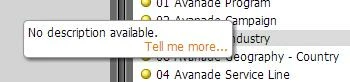
Each time I try to drag a dimension or metric (or right-click to add a filter) from the right side of RCA, these descriptor bubbles keep popping up beneath my mouse pointer, preventing me from dragging the attributes into my report.  Can these be turned off?  It's so annoying.

This post is no longer active and is closed to new replies. Need help? Start a new post to ask your question.

1 reply

June 26, 2014
Hi Dan,

Unfortunately, they can't be turned off, but we're fixing this in an upcoming release.  To give some context for others, this happens when panel is resized, not with the default size of the panel.  One alternative solution is to right-click, double-click, or drag-and-drop the grey bar.  It's not intuitiive, but it works.


TJ