How to take out Skype links? | Community
Skip to main content
March 10, 2014
Solved

How to take out Skype links?

  • March 10, 2014
  • 4 replies
  • 1823 views
It seems Skype's software now automatically creates embedded links to any phone number.  How do I delete this function with my email templates, programs, etc.?  My contact phone number is automatically converted to a Skype number and can ultimately create two phone numbers with my automated emails.

Thanks,
Kay
This post is no longer active and is closed to new replies. Need help? Start a new post to ask your question.
Best answer by
Hi Kay,

I have figured out the solution to the problem.

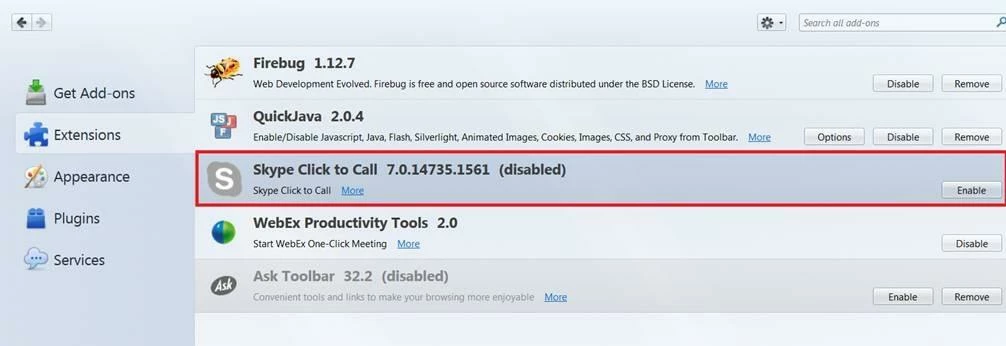
If you are using Mozilla firefox to design your Marketo email page, you have to disable the SKYPE plugin to prevent it from automatically appending the skype codes on to your Marketo emails. It worked.


regards,
Paul

4 replies

March 11, 2014
Hi Marketo Community,

I have the same issue. I have edited the HTML codes and yet no matter how many times I save after removing the skype codes, Marketo automatically appends these annoying codes back in.

The reason why I would like to remove it is because when I view a Marketo email sent on a yahoo email client/account, the skype phone number comes up twice.

Appreciate if anyone can share tips on how to switch this off.

regards,
Paul
Accepted solution
March 11, 2014
Hi Kay,

I have figured out the solution to the problem.

If you are using Mozilla firefox to design your Marketo email page, you have to disable the SKYPE plugin to prevent it from automatically appending the skype codes on to your Marketo emails. It worked.


regards,
Paul
March 11, 2014
Thank you Paul!  I found that plugin yesterday and removing it solved all my problems as well. 
March 21, 2014
This just saved me - thank you Paul!