
How to modify smart campaign for programs in engagement programs | Community
Skip to main content
Dan_Stevens_
Level 10
February 10, 2014
Question

How to modify smart campaign for programs in engagement programs

  • February 10, 2014
  • 14 replies
  • 2725 views
When adding a program to a stream in an engagement program, you need to specify the smart campaign to use:
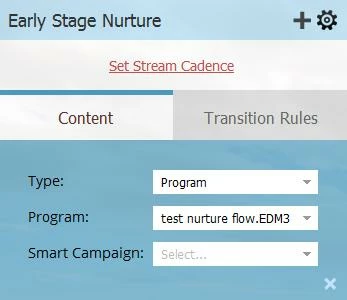


Once we define the smart campaign, how do we go back an modify this program within the stream (e.g., select a different smart campaign)?
This post is no longer active and is closed to new replies. Need help? Start a new post to ask your question.

14 replies

April 14, 2014

Hi Dan S.,

Assuming you have 2 Programs for that piece of content:

1. Content Channel tracking promotion on your site - Lead has downloaded and reached Success
2. Email Channel Program for use in the CEE - When a lead is marked in Program 1, also make them a member of this program, but not a "Success" status.

There are a number of ways to do this, but the fundamental issue is that the Program that the email is being sent from needs to have that lead as a member in order to skip it in your Stream. Just don't mark them as Success in that 2nd program so that your reporting is correct.

Dan_Stevens_
Level 10
April 15, 2014
Thanks Dan.  So would a potential solution be to add a new non-success program status to this channel (e.g., "engaged in other channel") to capture these leads properly?
April 15, 2014
Yep, or simply "Member" or whatever you'd like.
May 21, 2014
On a similar topic -- for an engagement program that uses a program as the asset, will Marketo automatically change the members' engagement program status to Email Blast > Opened or Email Blast > Clicked based on their behavior, or should that flow step be added to a trigger smart campaign within the email program?

Thanks!