Question
How to get a lightbox form submission to count as a conversion in Marketo?
For every landing page, there are basic reports that show total views and total form submissions. However, when you create a Form 2.0 as a lightbox, and add it to the LP using javascript, Marketo doesn't recognize that a form has been added to the landing page. As a result, when a visitor submits a form, the report shows 0 form conversions because it show "None" next to Forms on the landing page. Marketo only counts conversions from forms actually added to the landing page through the editor, rather than through java script.
Has anyone else found a way to get Marketo to recognize lightbox forms on their landing pages so conversions can be counted?
Here is my landing page with my lightbox form: http://pages.videojet.com/Water-Bottle-Printing-LP-B.html
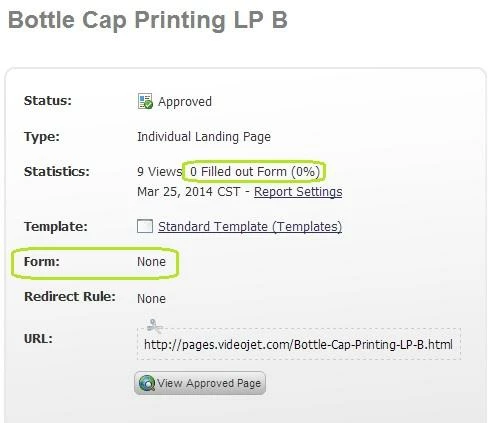
Has anyone else found a way to get Marketo to recognize lightbox forms on their landing pages so conversions can be counted?
Here is my landing page with my lightbox form: http://pages.videojet.com/Water-Bottle-Printing-LP-B.html