How to find the file name of an image placed on a landing page? | Community
Skip to main content
Brennan_McAdam2
Level 4
September 23, 2014
Solved

How to find the file name of an image placed on a landing page?

  • September 23, 2014
  • 2 replies
  • 2050 views
When using the drag and drop page editor, we have dropped an image into the page.  How do we determine which file has been select?

I am not referring to an html box where you get the image URL from the design studio.  Instead, when you are using the drag and drop image element.  How do you find out the image file name within the editor interface?
This post is no longer active and is closed to new replies. Need help? Start a new post to ask your question.
Best answer by Elliott_Lowe1
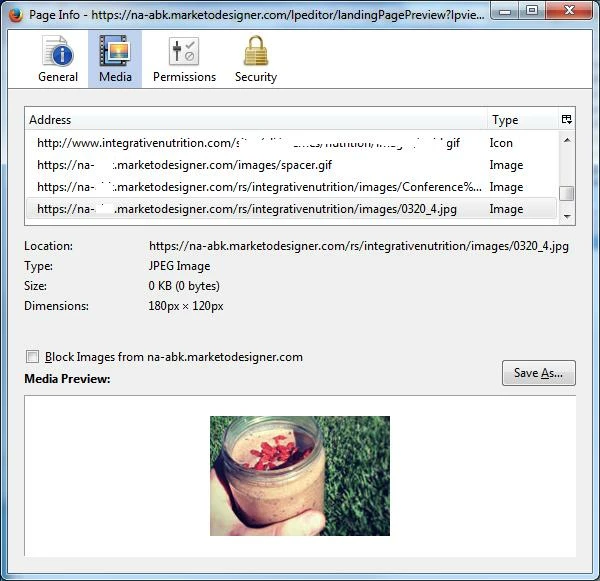
In the Landing Page Designer, chose Preview Draft.  Then right-click the image and chose View Image Info and the info for all the images is displayed in a dialog box.  This works in Firefox, but other browsers likely have similar capabilities. 

2 replies

Elliott_Lowe1
Elliott_Lowe1Accepted solution
Level 7
September 23, 2014
In the Landing Page Designer, chose Preview Draft.  Then right-click the image and chose View Image Info and the info for all the images is displayed in a dialog box.  This works in Firefox, but other browsers likely have similar capabilities. 

Brennan_McAdam2
Level 4
September 23, 2014
Thanks Eliott.  I am familiar with that method, but it seems to me that we should have that information in the UI for building the landing page.  What you get when you click edit is the Swap Image dialog box with the current image not pre-selected, but I would really like to know which image is already selected (say I want to replace the file).  The current implementation seems limited if we are having to hit a preview to find a file name.

Brennan McAdams