How to dynamically update a field in lead record | Community
Skip to main content
May 25, 2015
Solved

How to dynamically update a field in lead record

  • May 25, 2015
  • 1 reply
  • 3658 views

Here's what I'm trying to do, it's probably really simple so I would greatly appreciate some tips.

I want to update a custom field eg "CustomCompany" for all my leads with the value in the default "Company" field.

Tried a bunch of different things, via Smart Campaign etc, but to no avail. Any whiz marketer know how I can do this?
This post is no longer active and is closed to new replies. Need help? Start a new post to ask your question.
Best answer by

  and

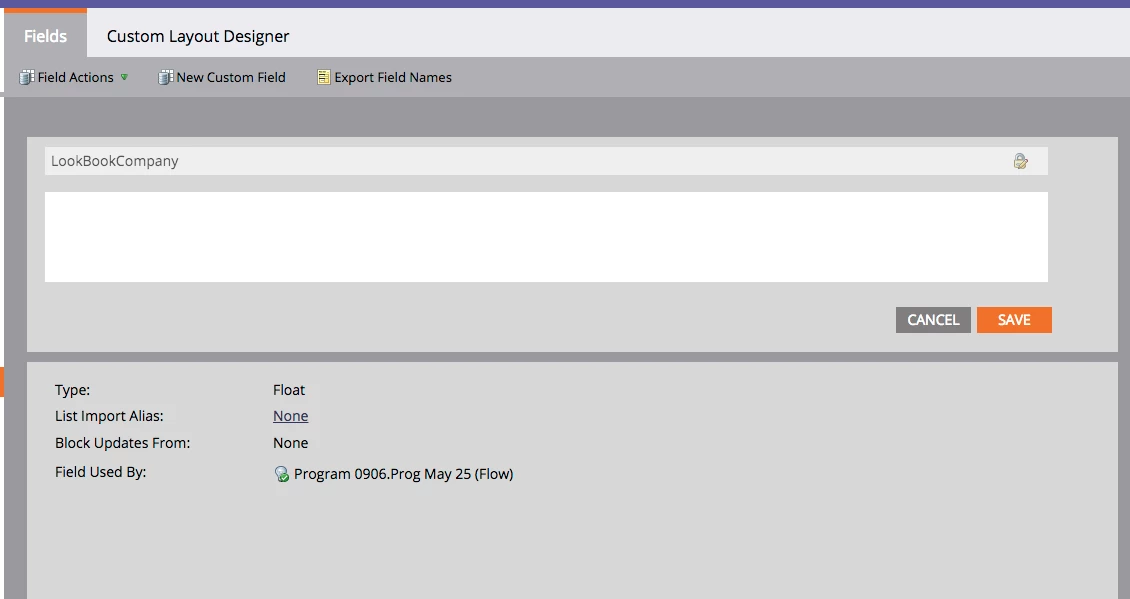
Does this shed some light?


Yes, it looks like the issue is with the field type. I found definitions in the discussion below that explains "Float" is for numbers with decimals so that is likely why the token is invalid. I generally use field type "String" for my text fields.

Re: field type definitions

1 reply

May 25, 2015

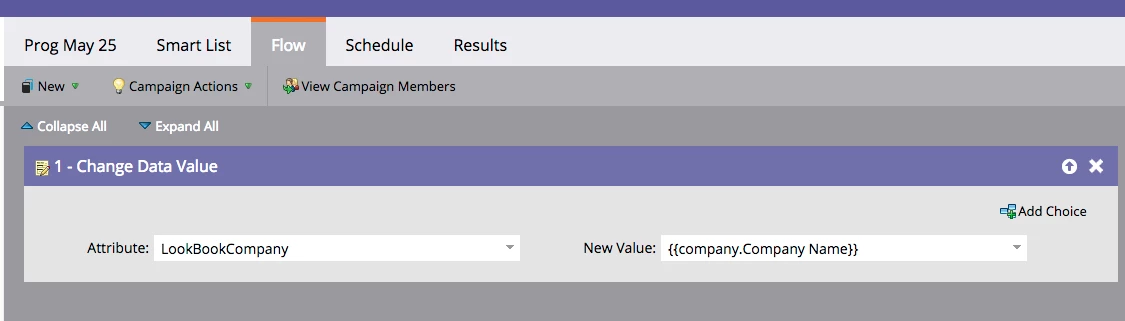
You can run a smart campaign, use flow step "Change Data Value" and select Attribute 'CustomCompany' and New Value '{{company.Company Name}}'.

May 26, 2015

Thanks Emily. Below is a screenshot of my attempting that, but it still didn't work

Did I miss something here?

May 26, 2015

That looks correct to me. I've included a screenshot below of my test flow and the results.

What is showing up for your test lead in the results tab?