How to build a report or smart list that shows who downloaded asset from a WC campaign, and clicked checkbox on form to be contacted/who did not? | Community
Skip to main content
Melanie_Kavalow
Level 2
May 20, 2019
Solved

How to build a report or smart list that shows who downloaded asset from a WC campaign, and clicked checkbox on form to be contacted/who did not?

  • May 20, 2019
  • 2 replies
  • 4334 views

Hello,

I'm new to using Marketo on my team, and hoping someone can help me. I am trying to create either a report or smart list to track who downloaded a specific asset, but also clicked on the option on the form where it says request to be contacted. Overall, i'm trying to see how many people have been downloading, but did not want to be contacted and who did. Is there a specific filter I should be using to collect this information? 
This post is no longer active and is closed to new replies. Need help? Start a new post to ask your question.
Best answer by Carrie_Chandle1

Hi @Melanie Kavalowskas‌... welcome to using Marketo! 

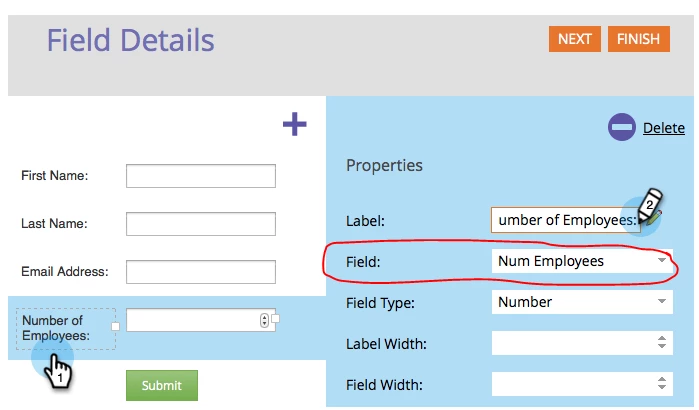
I'm assuming the request to be contacted checkbox on your form corresponds to a field? You can edit the form to see which field that is. In this example the name of the field is "Num Employees"

From there, create a smart list that uses the filter "filled out form" and specify which form you want to evaluate. Then, when you go to the People tab of the smart list, you can edit your view to show that form field (in this example "Num Employees") and you'll see the values... likely true/false or yes/no.

2 replies

Carrie_Chandle1
Carrie_Chandle1Accepted solution
Level 5
May 20, 2019

Hi @Melanie Kavalowskas‌... welcome to using Marketo! 

I'm assuming the request to be contacted checkbox on your form corresponds to a field? You can edit the form to see which field that is. In this example the name of the field is "Num Employees"

From there, create a smart list that uses the filter "filled out form" and specify which form you want to evaluate. Then, when you go to the People tab of the smart list, you can edit your view to show that form field (in this example "Num Employees") and you'll see the values... likely true/false or yes/no.

Melanie_Kavalow
Level 2
May 20, 2019

Hi Carrie,

Thank you for the feedback! I will give this a shot and see if it works!

Melanie_Kavalow
Level 2
May 20, 2019

Hi Carrie, 

Thank you for the advice--it gave me what I was looking for.

Best, 

Melanie

Carrie_Chandle1
Level 5
May 20, 2019

Awesome! If you don't mind, please mark the response as correct so your question gets moved off of the unanswered list