How to add H1 and H2 tags and use alt text for the image | Community
Skip to main content
Cecile_Maindron
Level 10
June 12, 2013
Solved

How to add H1 and H2 tags and use alt text for the image

  • June 12, 2013
  • 5 replies
  • 3446 views
Hi,

Our SEO company has suggested that I add on my landing pages H1 and H2 tags and use alt text for the pictures. Do you know how to do that?

Cécile @ Talend
This post is no longer active and is closed to new replies. Need help? Start a new post to ask your question.
Best answer by
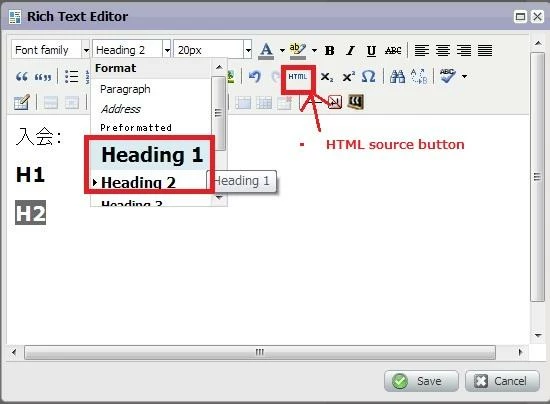
Just select "Heading1" and "Heading2" from the paragraph drop down list to use H1 and H2 tags. You can select the "HTML" button to see the generated HTML source.


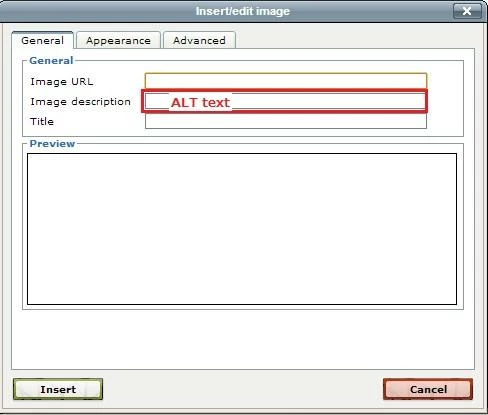
To add the Alt, just enter the text in the "Image Description" field which pops up when you click the "Image" icon.

5 replies

June 12, 2013
H1 and H2 apply to text. You can add them editing a Rich Text box and then clicking the HTML button, between Redo and Subscript. It opens the HTML Source Editor.
 
Locate the text you need to change font style and add < h 1 > text < / h 2 > 
There are no spaces. I added here to avoid the systems interpreting as valid tags.

A simple example consisting of word "test" would be geneated as
< p >< / p >test< p >< / p >< p >&nbsp;< / p >< p >< / p >
 
and the change would be
< p >< / p >< h 1 >test< p >< / p >< p >&nbsp;< / p >< / h 1>< p >< / p >

h1 is the largest text, h2 is smaller than h1.
Reference
http://www.w3schools.com/tags/tag_hn.asp
 
Accepted solution
June 12, 2013
Just select "Heading1" and "Heading2" from the paragraph drop down list to use H1 and H2 tags. You can select the "HTML" button to see the generated HTML source.


To add the Alt, just enter the text in the "Image Description" field which pops up when you click the "Image" icon.

Trish_Voskovitc
Level 5
September 10, 2013
how do i  add the alt text when image in an email? don't get the above edit box
Trish_Voskovitc
Level 5
September 10, 2013
i dont see the above box when i click on images on my landing pages?? how do i get to it exactly?
January 18, 2014
@Trish, I'm not sure if you're looking for an answer to this, but here's what you need to do:
(1) drag over "Rich Text" to the landing page editor's canvas
(2) copy & paste in an image
(3) select the image in the rich text editor and then click on the button below to see the box where you can set the image's ALT tag