How do you manually add a lead to a campaign? | Community
Skip to main content
July 28, 2014
Solved

How do you manually add a lead to a campaign?

  • July 28, 2014
  • 3 replies
  • 1566 views
Sales wants me to remove everyone from a specific partner of ours from our quarterly newsletter, except for one name. How do I adjust my smart list so it still removes the others from that partner, but then adds in this one person to the send? Can I manually add this one person?

Thanks!
This post is no longer active and is closed to new replies. Need help? Start a new post to ask your question.
Best answer by AlokRa4
In addition to Josh,

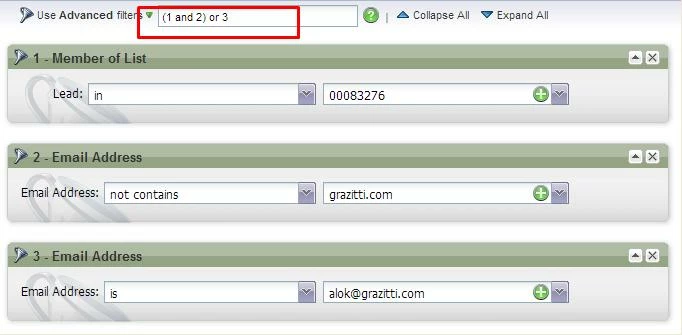
Make sure you have set the use of filters as "Use Advanced Filters" and modify them so that they don't clash. 

The following screenshot highlights the same,


3 replies

Josh_Hill13
Level 10
July 29, 2014
yes,

just do Email Addres = X and it will be included.
AlokRa4Accepted solution
Level 10
July 29, 2014
In addition to Josh,

Make sure you have set the use of filters as "Use Advanced Filters" and modify them so that they don't clash. 

The following screenshot highlights the same,


July 29, 2014
Thanks, Alok, that worked. Just doing Email = X left me with 0 leads, but making sure the advanced filters was set did the trick!