How do you make the initial value on a dropdown field blank? | Community
Skip to main content
January 7, 2013
Solved

How do you make the initial value on a dropdown field blank?

  • January 7, 2013
  • 2 replies
  • 1386 views
How do you make the initial value on a dropdown field blank and have that trigger the required notification if the lead does not select a value?
This post is no longer active and is closed to new replies. Need help? Start a new post to ask your question.
Best answer by
in the Form Designer, select the field that you wish to edit. 

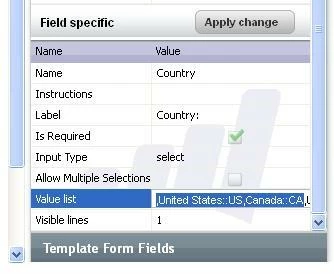
In its Field Specific Form Properties, select the Value field and add a comma at the start of the list of values similar to the screen shot below.

2 replies

Accepted solution
January 7, 2013
in the Form Designer, select the field that you wish to edit. 

In its Field Specific Form Properties, select the Value field and add a comma at the start of the list of values similar to the screen shot below.

January 7, 2013
Thanks, I did that and it wasn't working, but discovered that it was because I had been cookied.