How do I make an image and image link dynamic/segmentable?
Hi Community,
I am trying to modify an existing module so that I can use segmentation (dynamic content) on both an image and the link embedded on the image.
Thus far, I am only able to dynamically segment the image URL (i.e. I can set a different image for each segment), but I cannot access the link embedded on the image to segment that (i.e. I can't change out the link that I want people to go to when they click on the image). (**Ignore the Invalid Image URL warning--it goes away after updating the image URL)
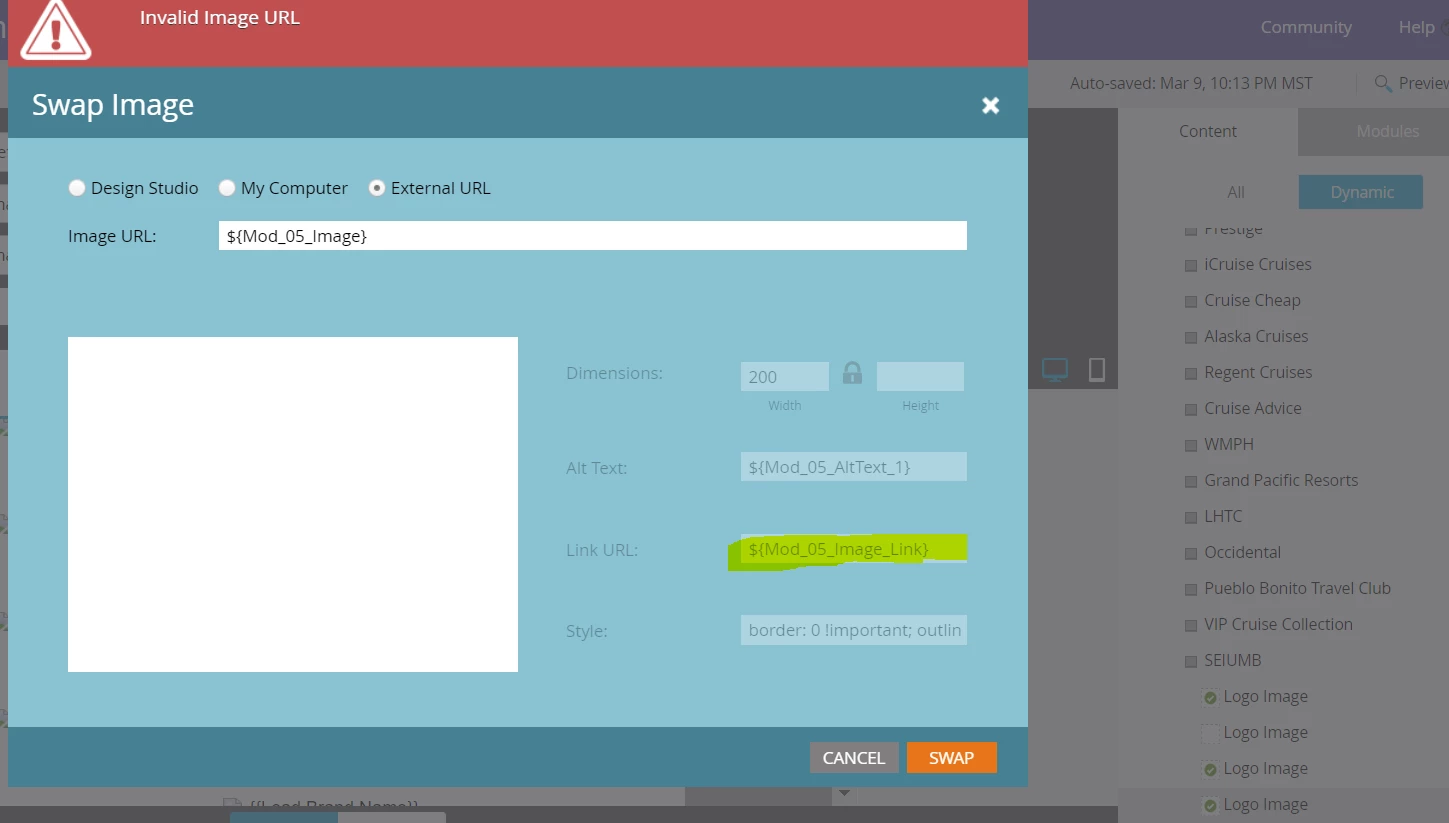
Below is the code for the module. The ID for the image in question is "Mod_09_Logo".
   <td align="center" valign="top" style="border-collapse: collapse; mso-line-height-rule: exactly; padding:${section_top_space_01} 0px ${section_bottom_space_01} 0px;">
            <table align="center" width="600" border="0" cellspacing="0" cellpadding="0" class="em_main_table" style="border-collapse: collapse; mso-table-lspace: 0px; mso-table-rspace: 0px; width:600px; table-layout:fixed;" bgcolor="${Mod_01_BG_Color}">
              <tbody>
                <tr>
                  <td align="center" valign="top" style="border-collapse: collapse; mso-line-height-rule: exactly; padding:25px 22px 20px 22px;" class="em_plrtb_01">
                    <table width="556" border="0" cellspacing="0" cellpadding="0" style="border-collapse: collapse; mso-table-lspace: 0px; mso-table-rspace: 0px; width:556px;" class="em_wrapper">
                      <tbody>
                        <tr>
                          <td align="center" valign="top" style="border-collapse: collapse; mso-line-height-rule: exactly; ">
                            <table width="100%" border="0" cellspacing="0" cellpadding="0" style="border-collapse: collapse; mso-table-lspace: 0px; mso-table-rspace: 0px; ">
                              <tbody>
                                <tr>
                                  <td valign="top" style="border-collapse: collapse; mso-line-height-rule: exactly; ">
                                    <table width="200" border="0" cellspacing="0" cellpadding="0" align="left" style="border-collapse: collapse; mso-table-lspace: 0px; mso-table-rspace: 0px; width:200px;" class="em_wrapper">
                                      <tbody>
                                        <tr>
                                          <td align="center" valign="top" class="em_pbottom" style="border-collapse: collapse; mso-line-height-rule: exactly; "><div class="mktoImg" mktoname="Logo Image" id="Mod_9_logo" mktoImgLink="${Mod_05_Image_Link}"><a><img src="${Mod_05_Image}" width="200"
                                            alt="${Mod_05_AltText_1}" style="border: 0 !important; outline: none !important; display:block;max-width:200px;font-family:Helvetica, Arial,
                                            sans-serif;font-size:15px;line-height:18px;color:#000000;" border="0" /></a></div></td>
                                        </tr>
                                      </tbody>
                                    </table>
                                    <table width="300" border="0" cellspacing="0" cellpadding="0" align="right" style="border-collapse: collapse; mso-table-lspace: 0px; mso-table-rspace: 0px; width:300px;" class="em_wrapper">
                                      <tbody>
                                        <tr>
                                          <td align="right" valign="top" class="em_defaultlink em_center" style="border-collapse: collapse; mso-line-height-rule: exactly; font-family:'Helvetica', Arial, sans-serif;font-size:14px;line-height:18px;color:${Mod_07_Font_Color};font-weight:bold;">
                                            <div id="Phone_Text_Mod_09" mktoname="Phone text" class="mktoText" style="border-collapse: collapse; mso-line-height-rule: exactly; text-decoration:none; color:${Mod_07_Font_Color};"><a href="${Mod_09_Text_1_Link}" target="_blank"
                                              style="border-collapse: collapse; mso-line-height-rule: exactly; color: inherit; text-decoration: none;color:${Mod_07_Font_Color};">{{Lead.Brand Phone}}</a></div>
                                          </td>
                                        </tr>
                                        <tr>
                                          <td align="right" valign="top" class="em_defaultlink_und em_center" style="border-collapse: collapse; mso-line-height-rule: exactly; font-family:'Helvetica', Arial, sans-serif;font-size:14px;line-height:18px;color:${Mod_07_Font_Color};"><div id="Mod_09_My_Account_Text" mktoname="My Account text" class="mktoText" style="border-collapse: collapse; mso-line-height-rule: exactly; text-decoration:none; color:${Mod_07_Font_Color};"><a href="${Mod_09_Text_2_Link}" target="_blank"
                                            style="border-collapse: collapse; mso-line-height-rule: exactly; color: inherit; text-decoration: underline; text-decoration:underline;color:${Mod_07_Font_Color};">${Mod_09_Text_2}</a></div></td>
                                        </tr>
                                      </tbody>
                                    </table>
                                  </td>
                                </tr>
                              </tbody>
                            </table>
                          </td>
                        </tr>
                      </tbody>
                    </table>
                  </td>
                </tr>
              </tbody>
            </table>
          </td>
        </tr>
Below is the meta class associated with the image in question:
<meta class="mktoImg" id="Mod_09_Logo" mktoname="Mod_09_Logo" default="Lead.Brand Logo}}" mktomodulescope="true" />
I was reading through this document and tried different things, but no luck yet: https://experienceleague.adobe.com/docs/marketo/using/product-docs/email-marketing/general/email-editor-2/email-template-syntax.html?lang=en
Any help that could be provided would be much appreciated.
Thanks,
LK