How do i delete a custom field? | Community
Skip to main content
March 30, 2015
Solved

How do i delete a custom field?

  • March 30, 2015
  • 1 reply
  • 2175 views
I'm a new Marketo user. I created a new custom field but after thinking about it a little more I am not happy with the name I gave it. I would like either to delete it so I can start over or edit it so I can change that name. What's the best way?
This post is no longer active and is closed to new replies. Need help? Start a new post to ask your question.
Best answer by Dan_Stevens_

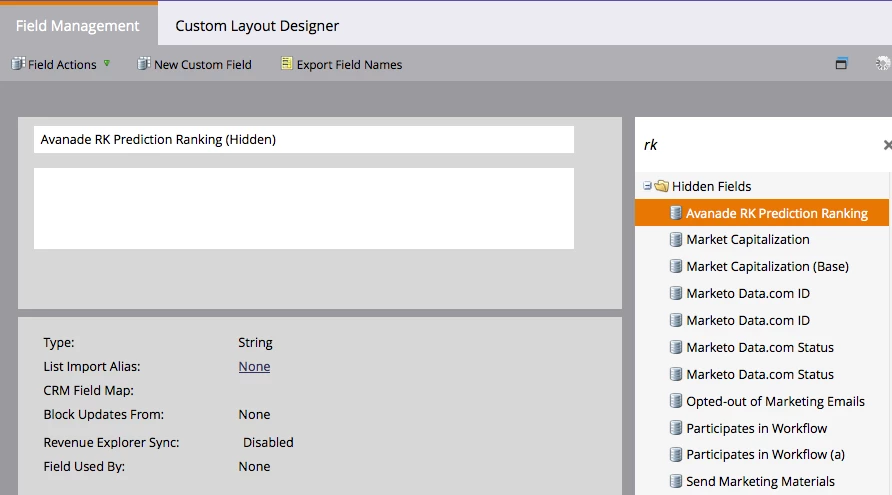
Double-click the name in the title area and it will become editable.  You can only rename it if it hasn't been used anywhere:

1 reply

Robert_Solis1
Level 3
March 30, 2015
Hi Jim,

Custom Fields can only be hidden in Marketo, not deleted.  If you would like to change the name of the Field, that can be done from the Admin page in the Field Management section.  

https://community.marketo.com/MarketoArticle?id=kA050000000KypMCAS
September 24, 2015

I can't seem to find where to change the name of a custom field.  Can you tell me where to go to change the name?

Dan_Stevens_
Dan_Stevens_Accepted solution
Level 10
September 25, 2015

Double-click the name in the title area and it will become editable.  You can only rename it if it hasn't been used anywhere: