How can you line the check box up to be next to your copy? | Community
Skip to main content
October 14, 2014
Solved

How can you line the check box up to be next to your copy?

  • October 14, 2014
  • 4 replies
  • 1392 views
In a form, I would like someone to be able to select multiple answers by checking boxes. When I add them to the form, the checkbox is below the copy. Is there a way to line them up?

Thank you,
Mandy
This post is no longer active and is closed to new replies. Need help? Start a new post to ask your question.
Best answer by Dory_Viscoglio
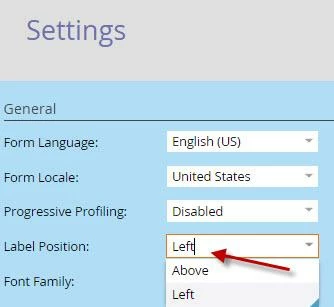
Hi Mandy, in the settings of the form, do you have the label position as Left, or Above?


4 replies

Kenny_Elkington
Adobe Employee
Adobe Employee
October 14, 2014
Hey Mandy,

You can drag and drop all fields in a Marketo form.  Is this not working for you?
October 14, 2014
 No, it is placing the checkbox under the copy field. I want to pull the box up next to the copy...see below for the way it looks in the form and also on my landing page. 

 
Dory_Viscoglio
Dory_ViscoglioAccepted solution
Level 10
October 14, 2014
Hi Mandy, in the settings of the form, do you have the label position as Left, or Above?


October 14, 2014
Thank you!! It worked :)