How can you create a 301 redirect | Community
Skip to main content
June 3, 2015
Solved

How can you create a 301 redirect

  • June 3, 2015
  • 1 reply
  • 2254 views

Hi Community-

How do you create 301 redirects?  I know it is possible, as I think I have seen this option in the past but I can't seem to find it now.  I am going through my database and deactivating all of the inactive landing pages, but I wanted to create 301 redirects just in case someone has the link.

Thanks!
This post is no longer active and is closed to new replies. Need help? Start a new post to ask your question.
Best answer by Edward_Unthank_

Hey Kristin, two options for creating 301 redirects in landing pages:

First Option:

When you change a landing page's URL, you have the option of removing the old URL or redirecting the old URL to the new one. That's when you're just changing the URL on an existing landing page and not deleting it.

Second Option:

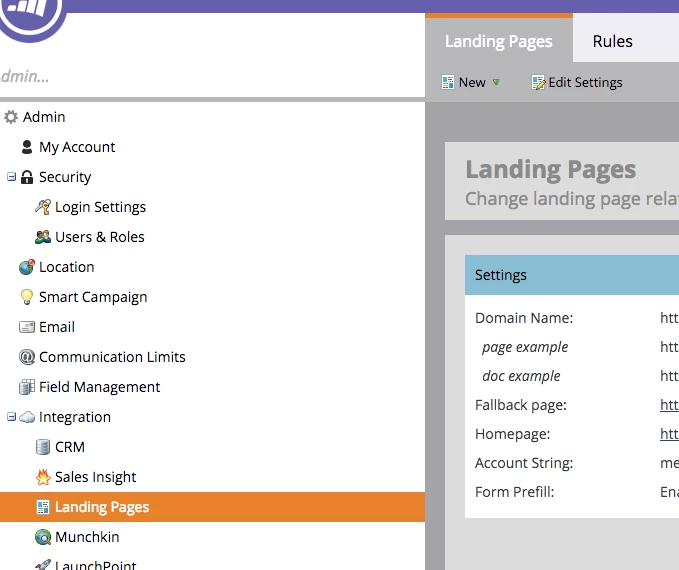
In the Admin section, you can go to: Landing Pages and then the "Rules" tab.

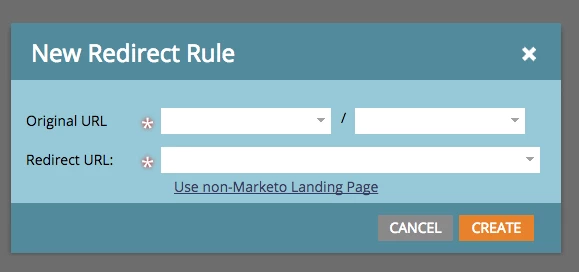
Then in the "Rules" tab you can select "New" and "New Redirect Rule" and you'll get this pop-up where you can add 301 redirects:

Cheers,

Edward Unthank | Founder, Etumos

1 reply

Edward_Unthank_
Edward_Unthank_Accepted solution
Level 7
June 3, 2015

Hey Kristin, two options for creating 301 redirects in landing pages:

First Option:

When you change a landing page's URL, you have the option of removing the old URL or redirecting the old URL to the new one. That's when you're just changing the URL on an existing landing page and not deleting it.

Second Option:

In the Admin section, you can go to: Landing Pages and then the "Rules" tab.

Then in the "Rules" tab you can select "New" and "New Redirect Rule" and you'll get this pop-up where you can add 301 redirects:

Cheers,

Edward Unthank | Founder, Etumos

June 3, 2015

Awesome, thanks Edward Unthank​!