
How can we change the favicon on file link? | Community
Skip to main content
Kanako_Tone2
Level 2
August 28, 2018
Question

How can we change the favicon on file link?

  • August 28, 2018
  • 1 reply
  • 2794 views

I learned how to change the favion on Marketo LPs; it seems to require adding 2 lines of code.

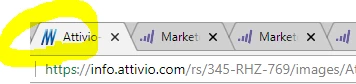
What about updating the favicon on the file page link? I mean,,, see below. It's the link to one of our eBook PDF file, and I wonder how I can change this favicon here. In the Image/File section under Design Studio, I don't see options to tweak the code.
This post is no longer active and is closed to new replies. Need help? Start a new post to ask your question.

1 reply

SanfordWhiteman
Level 10
August 28, 2018
Kanako_Tone2
Level 2
August 29, 2018

Hi Sanford,

If I'm reading this correctly, there's no procedure in this page other than "fix it anyway" section that has the redirect rule. Is it what you're referring to? (if not, I probably need a few more cups of coffee before re-reading it).

Also out of curiosity,,, if marketo LPs and Marketo-hosted files have a default code for favicon pulling from our main homepage, I wonder why the favicon on home page and favicon on Marketo pages are different... The screenshot I posted has the old logo and it's not same as what I see on our main homepage.

Kanako_Tone2
Level 2
August 29, 2018

Never mind. I just updated the image file link and it worked.