Hiding a form field if the visitor is known and a member | Community
Skip to main content
Level 2
May 25, 2023
Solved

Hiding a form field if the visitor is known and a member

  • May 25, 2023
  • 1 reply
  • 2808 views

Hi Everyone,

I am trying to find the solution to adding the KVHTML code on Forms 2.0 to hide or fade the field if the First Name and Email Address field is auto-populated for the members. Below highlighted is the field with two options i.e. Yes or No which we would like to hide if First Name and email are auto-populated. It is a captcha-enabled form.  
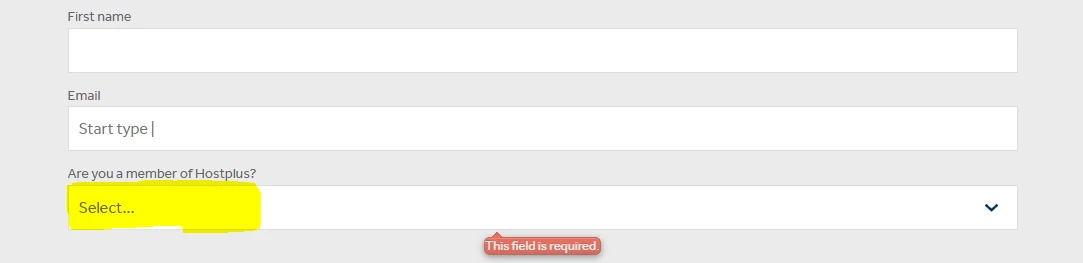
Is there any other way to fade/hide this field.?


Kind Regards,

Vidhi


This post is no longer active and is closed to new replies. Need help? Start a new post to ask your question.
Best answer by SanfordWhiteman
  • Create a new String field that you add to the form as Hidden. It can be a reusable field, so call it something generic like Form Visibility Manager 01.
  • Configure a VR so the Member field shows only if Form Visibility Manager 01 is not empty.
  • In a whenReady listener (which fires after pre-fill) check if First Name and Email Address are both filled. If either one is empty, set Form Visibility Manager 01 (using setValues()) to a meaningful value like “yes”. This will trigger the VR to show the Member field.

1 reply

SanfordWhiteman
Level 10
May 25, 2023

Not sure why you’re referring to KV HTML. KV HTML is a complete replacement for the visible form if the person is known.


You can enable Visibility Rules for Are you a member? to only show that field if First Name or Email Address has been pre-filled.


You can’t have Visibility Rules that show a field based on 2 other fields simultaneously (i.e. First Name and Email Address). For that you’d need JavaScript.


Also, “member” has a specific meaning within Marketo (program member) but you’re just talking about a Boolean field. Always good to be as clear as possible about your business terminology so it doesn’t overlap with Marketo terms.

VidhiKh1Author
Level 2
May 25, 2023

Hi @sanfordwhiteman 

Thank you for your input. Appreciate it!

Sorry for mixing up the Marketo terms. When I mentioned member then I meant that the record is already in our database.

  • Also, I was trying out a solution to replace the form with a new form & only two field values with custom HTML if a visitor is known but I was confused with the concept of KVHTML. Thank you for highlighting its use case.
  • I tried using the Visibility rules on the field 'Are you a member' using the 'If condition' in the editor. But it did not help as I added Show Field If Email is empty and as soon as the value got filled in the Email field, the field disappeared. I guess it is my mistake as it is not how it works.
  • I think adding a JS code would solve my problem on the Marketo-hosted Landing Page.

Kind Regards,

Vidhi


SanfordWhiteman
SanfordWhitemanAccepted solution
Level 10
May 25, 2023
  • Create a new String field that you add to the form as Hidden. It can be a reusable field, so call it something generic like Form Visibility Manager 01.
  • Configure a VR so the Member field shows only if Form Visibility Manager 01 is not empty.
  • In a whenReady listener (which fires after pre-fill) check if First Name and Email Address are both filled. If either one is empty, set Form Visibility Manager 01 (using setValues()) to a meaningful value like “yes”. This will trigger the VR to show the Member field.